
If you want to swap out a fixed run of characters at a known position inside a cell, the REPLACE function in Google Sheets is what you need.
It works by position, not by content. You tell it where to start, how many characters to remove, and what to drop in their place. In this article, I’ll show you how to use REPLACE to mask card numbers, hide phone digits, roll a year forward, and retag SKU prefixes.
REPLACE Function Syntax in Google Sheets
Here is how the REPLACE function is written:
=REPLACE(text, position, length, new_text)
- text is the original string or cell reference you want to edit.
- position is the character position to start at, counted from 1.
- length is how many characters to remove from that position.
- new_text is the string that gets dropped in. Pass
""to delete without replacing.
REPLACE always works on a known position. If you instead need to swap a specific piece of text by content, look at the SUBSTITUTE function.
When to Use REPLACE Function
- Mask a fixed portion of an ID, like the first 12 digits of a credit card number.
- Hide the middle of a phone number while keeping the prefix and suffix visible.
- Update a fixed-width prefix or year code without touching the rest of the string.
- Insert text at a specific position without removing anything (use a length of 0).
- Retag a category prefix in a structured SKU.
Example 1: Mask All But The Last Four Card Digits
Let’s start with the classic case for REPLACE, masking sensitive digits in a fixed-width ID.
Below is the dataset, with 16-digit card numbers in column A, across rows 2 to 6. Every number has the same length, so the position of the digits we want to mask is identical for each row.
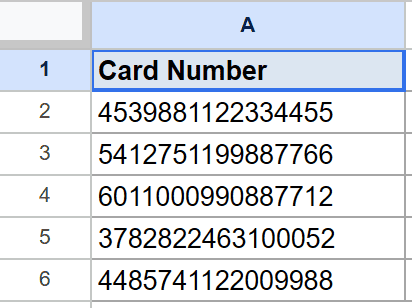
You want to keep the last four digits visible and mask the first twelve with a placeholder string.
Here is the formula:
=REPLACE(A2,1,12,"XXXX-XXXX-XXXX-")
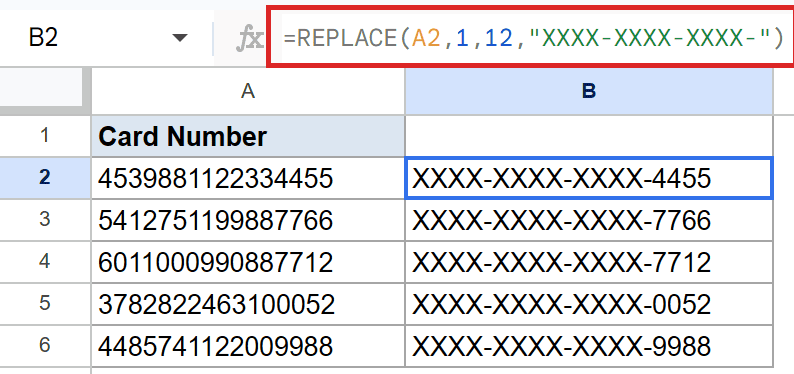
REPLACE starts at position 1, takes 12 characters out, and drops in the masking string in their place. The first row becomes XXXX-XXXX-XXXX-4455. Every other row follows the same pattern because the card numbers are the same length.
This is the kind of cleanup you can’t easily do with SUBSTITUTE, because the digits you want to hide change from row to row. The position, on the other hand, stays the same.
Pro Tip: REPLACE positions are 1-indexed. Position 1 is the first character, not the second. If you’re coming from a language where strings start at 0, this is an easy slip to make.
Example 2: Mask The Middle Digits Of A Phone Number
Same idea, just with a target in the middle of the string instead of the start.
Below is the dataset, with US-style phone numbers in column A, across rows 2 to 6. Every row uses the same 555-NNN-NNNN shape, so the three digits we want to hide always sit at the same position.
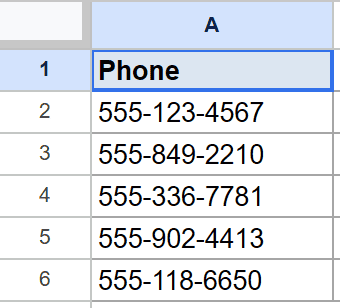
You want to mask the middle three digits of each number while keeping the area code and the last four digits readable.
Here is the formula:
=REPLACE(A2,5,3,"XXX")
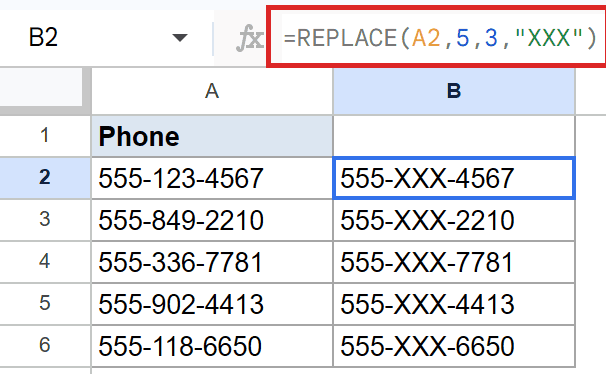
The position is 5 because the first three digits and the dash take up positions 1 through 4. The length is 3, covering the middle digits. The replacement string is the same length, so the result keeps its overall shape.
If your phone numbers had a different format, this exact formula wouldn’t work. REPLACE is built for fixed-width inputs where the target sits at a predictable spot.
Example 3: Update The Year Prefix In A Quarter Code
Quarter codes are another case where the position you want to edit is rock-solid.
Below is the dataset, with quarter codes in column A, across rows 2 to 6. Each code starts with a four-digit year, followed by a dash, the quarter label, another dash, and an ID.
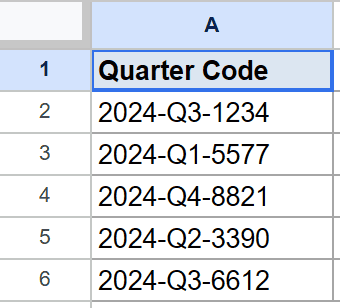
You want to roll the year forward from 2024 to 2025 across the whole column.
Here is the formula:
=REPLACE(A2,1,4,"2025")
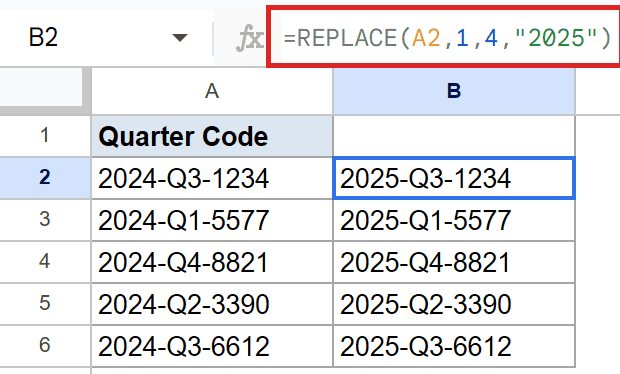
REPLACE swaps out the first four characters and writes 2025 in their place. The rest of each code is left alone, so 2024-Q3-1234 becomes 2025-Q3-1234 and the same shift applies to every row.
Because the new string is the same length as the old one, the codes keep their original width. This makes REPLACE handy whenever you have to bulk-rewrite a fixed-width field.
Example 4: Mask The Area Code Of A Formatted Phone String
This example is the natural place to contrast REPLACE with SUBSTITUTE side by side.
Below is the dataset, with formatted phone numbers in column A, across rows 2 to 6. Each one wraps the area code in parentheses, then has a space, the prefix, a dash, and the last four digits.
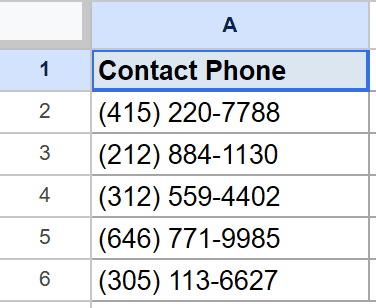
You want to mask only the area code, keeping the parentheses, the space, and the rest of the number intact.
Here is the formula:
=REPLACE(A2,2,3,"XXX")
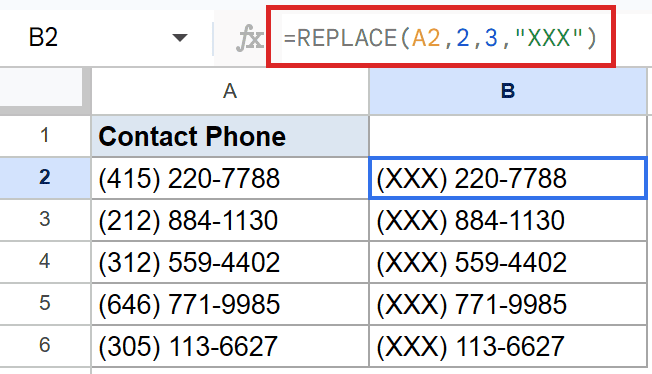
The position is 2 because the opening parenthesis sits at position 1. The length is 3 to cover the three digits of the area code. The first row becomes (XXX) 220-7788, with the same swap applied to every other row.
You couldn’t do this cleanly with SUBSTITUTE. The actual digits change from row to row, so there’s no single search-and-replace pair that targets them all. REPLACE handles this fine because it works on position, not content.
Pro Tip: To insert text at a position without removing anything, pass a length of 0. The formula =REPLACE(A2,4,0,”-“) drops a dash at position 4 and pushes everything that was already there to the right.
Example 5: Swap The Category Prefix In A Product Code
The last example is a clean retag of a category prefix in a structured SKU.
Below is the dataset, with electronics SKUs in column A, across rows 2 to 6. Every code starts with the same three-letter prefix ELC, a dash, and a five-digit ID.
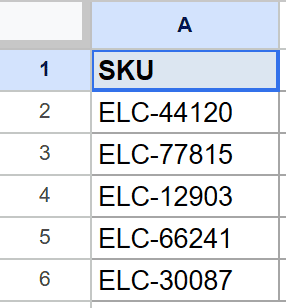
You want to move these items into the home appliances category by swapping the ELC prefix for HMA.
Here is the formula:
=REPLACE(A2,1,3,"HMA")
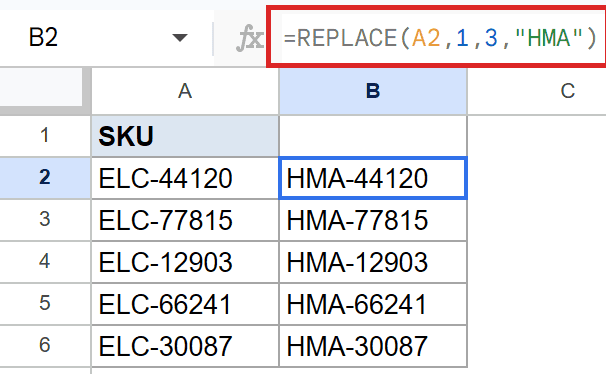
REPLACE grabs the first three characters and writes HMA in their place. The dash and the ID number stay untouched, so ELC-44120 becomes HMA-44120 and every row gets the same retag.
Both REPLACE and SUBSTITUTE could handle this one, since the prefix is the same on every row. The position-based approach is the simpler read here. The 1,3 tells the reader exactly what’s getting overwritten without making them scan for a substring.
Tips & Common Mistakes
- Position counting starts at 1. The first character is at position 1, not 0. Position 0 returns #VALUE! and a negative position does the same.
- A length of 0 inserts without overwriting. Pass
0for the length to drop new text in at that spot while keeping everything else in place. This is the cleanest way to add a separator at a fixed position. - If the start position is past the end of the string, the new text gets appended. REPLACE doesn’t error out, it just sticks the replacement onto the end. Useful when you want a trailing tag added regardless of input length.
REPLACE is the function to reach for whenever the slice you want to edit lives at a predictable spot in the cell. Tell it where to start, how many characters to take, and what to drop in.
For content-based swaps where you know the text but not the position, switch to SUBSTITUTE. For position-based edits where the target sits at the same place every row, REPLACE is the cleaner pick.
List of All Google Sheets Functions
Related Google Sheets Functions / Articles: