
LEN counts characters in a cell, including spaces and punctuation. It helps check product-code lengths, flag short entries and build text formulas.
LEN function syntax
=LEN(text)- text: a cell, text string or value to measure.
Set up the example data
Enter this small dataset starting in A1. The first row contains headers. Keep the formula output separate from the input cells.
| Text |
|---|
| MICRO-101 |
| WIDGET-A22 |
| GADGET-7 |
| BOLT-XL-99 |
| PIN-001 |
Count characters in a list
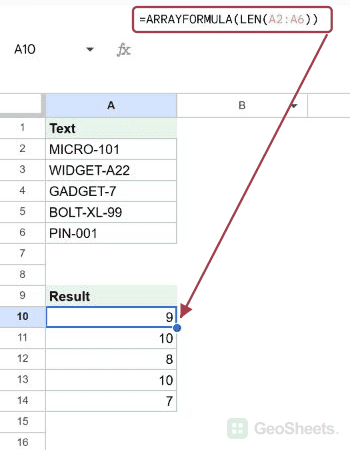
Enter this in A10 to calculate all five lengths. For one row, use LEN(A2) and fill down. The hyphen contributes one character.
=ARRAYFORMULA(LEN(A2:A6))Result: 9; 10; 8; 10; 7.
Check a minimum length
Good. has five characters. Change the threshold or reference a dedicated input cell when the rule needs to be editable.
=IF(LEN("Good.")<20,"Too short","OK")Result: Too short.
Count space-separated words
Test the trimmed text for emptiness before adding one to the space count. This prevents a space-only cell from being counted as one word.
=IF(LEN(TRIM(" "))=0,0,LEN(TRIM(" "))-LEN(SUBSTITUTE(TRIM(" ")," ",""))+1)Result: 0.
Count words in a sentence
TRIM removes outer spaces and reduces repeated ordinary spaces between words. SUBSTITUTE removes the remaining spaces so the length difference counts separators.
=IF(LEN(TRIM(" Hello world. "))=0,0,LEN(TRIM(" Hello world. "))-LEN(SUBSTITUTE(TRIM(" Hello world. ")," ",""))+1)Result: 2.
Pad an ID without truncating it
MAX prevents a negative repetition count when an ID is already longer than six characters. The output is text; longer IDs remain unchanged.
=REPT("0",MAX(0,6-LEN("5000")))&"5000"Result: 005000.
Ignore spaces in the character count
Removing spaces leaves A, B, a hyphen and a digit. This is a non-space character count, not a count of letters only.
=LEN(SUBSTITUTE("A B-2"," ",""))Result: 4.
Apply the word count to your own cell
Put the sentence in A18, then use this reusable version. For Hello world. it returns two. The initial test also returns zero for an empty or ordinary-space-only entry.
=IF(LEN(TRIM(A18))=0,0,LEN(TRIM(A18))-LEN(SUBSTITUTE(TRIM(A18)," ",""))+1)Result: 2.
Other Google Sheets articles you may also like