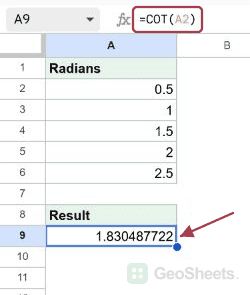
The COT function returns the cotangent of an angle in radians. Cotangent is just the cosine divided by the sine, or one over the tangent.
This guide covers four examples, from plain radian values to converting degrees and proving that COT matches 1 divided by TAN. You will also learn the angles that break it.
COT Function Syntax in Google Sheets
Here is how you write the COT function.
=COT(angle)
angleis the angle in radians. It is the only argument, and it is required.
When to Use COT Function
- You need the cotangent of an angle for a trig or geometry calculation.
- You are working with the reciprocal of the tangent and want it in one step.
- You are checking standard angles like 30, 45, or 60 degrees.
- You are building an engineering sheet that already deals in radians.
- You want a shorter alternative to writing 1/TAN every time.
Example 1: Cotangent of Plain Radian Values
Let’s begin with plain radian values typed straight into a column.
Below is the dataset. Column A holds five angles in radians (0.5, 1, 1.5, 2, and 2.5), and column B is empty for the cotangent. Notice there is no 0 in the list, which matters here.

I want the cotangent of each radian value in column A.
Here is the formula:
=COT(A2)

COT reads the radian value in A2 and returns its cotangent.
At 0.5 radians you get about 1.8305, and the result shrinks as the angle grows. By 1.5 radians it is down near 0.0709, then it goes negative at 2 and 2.5 radians, landing around -0.4577 and -1.3386. The sign flip past a certain point is expected.
Pro Tip: To get the whole column with one formula instead of filling down, wrap it in ARRAYFORMULA: =ARRAYFORMULA(COT(A2:A6)). Same result.
Example 2: Cotangent of Degrees Using RADIANS
Most angles you meet are in degrees, so here is the conversion.
Below is the dataset. Column A lists angles in degrees (30, 45, 60, and 120), with column B blank for the cotangent.

I want the cotangent of each angle, but the values are in degrees.
Here is the formula:
=COT(RADIANS(A2))

COT only reads radians, so RADIANS converts the degree value first and then COT takes over.
The answers match the textbook. 30 degrees gives about 1.7321, 45 degrees comes out at exactly 1, and 60 degrees returns roughly 0.5774.
At 120 degrees the result turns negative at about -0.5774. Forget the RADIANS step and every one of these would be wrong.
Example 3: Cotangent of PI Fractions
Sometimes the angle comes from PI rather than a typed decimal.
Below is the dataset. Column A names the fraction (PI/6, PI/4, PI/3, PI/2.5), column B holds the actual radian value from a PI formula, and column C is empty.

I want the cotangent of each radian value sitting in column B.
Here is the formula:
=COT(B2)

Since B2 already holds a radian value built from PI(), you pass it straight into COT with no conversion.
PI/6 returns about 1.7321 and PI/4 returns exactly 1. PI/3 gives roughly 0.5774, and PI/2.5 comes out near 0.3249. Using PI() this way keeps the angles precise.
Example 4: COT Matches 1 Divided by TAN
This one proves a handy fact about cotangent.
Below is the dataset. Column A holds three radian values (0.5, 1, 1.5), column B works out 1 divided by TAN, and column C is empty for the COT result.

I want to show that COT of an angle gives the same number as 1 divided by its tangent.
Here is the formula:
=COT(A2)

Column B already calculated 1/TAN for each angle, and column C runs COT on the same angle. The two columns match exactly.
At 0.5 radians both columns read about 1.8305, at 1 radian both show roughly 0.6421, and at 1.5 radians both land near 0.0709. So COT is just a shorter way to write 1/TAN.
Tips & Common Mistakes
- COT expects radians, not degrees. This trips up almost everyone. If you type =COT(45) hoping for the cotangent of 45 degrees, you get the cotangent of 45 radians instead. Wrap the degree value in RADIANS first.
- COT is undefined at 0 and at every multiple of PI. At those angles the sine is 0, so you would be dividing by zero and Google Sheets returns #DIV/0!. Keep your inputs away from 0, PI, 2*PI, and so on.
- COT equals 1 divided by TAN. If you ever forget the function name, =1/TAN(angle) gives the same answer, as Example 4 shows.
COT returns the cotangent of an angle in radians, nothing more. Remember to convert degrees with RADIANS, and steer clear of 0 and multiples of PI where the function blows up. After that it behaves just like 1/TAN.
List of All Google Sheets Functions
Related Google Sheets Functions / Articles: