
COS returns the cosine of an angle in Google Sheets. Its input is measured in radians, even when your source data labels angles in degrees.
Convert degree values with RADIANS before using COS. The examples also show π-based angles, a vector component, and why an expected zero can display as a tiny decimal.
COS function syntax
=COS(angle)- angle: the angle in radians, entered directly or referenced from a cell.
The Google COS reference describes the function arguments.
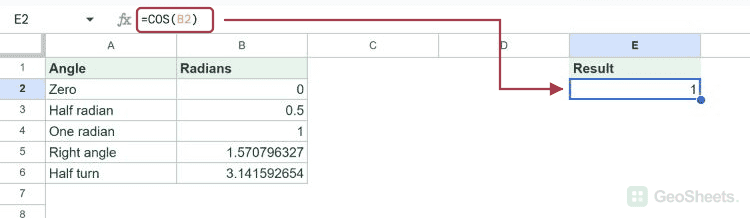
Example data
Enter this dataset starting in A1. Leave cells marked “leave empty” empty; type any displayed formula as a formula. Keep a separate blank area for the results.
| Angle | Radians |
|---|---|
| Zero | 0 |
| Half radian | 0.5 |
| One radian | 1 |
| Right angle | =PI()/2 |
| Half turn | =PI() |
The examples below use this dataset unless the formula supplies its own values. Array results need enough empty cells to expand. The formulas use commas as argument separators. Your spreadsheet locale may require semicolons.
Calculate cosine in radians
Zero radians has a cosine of 1.
=COS(B2)Result: 1
A plain input of 1 means one radian, not one degree. Its cosine is approximately 0.5403.
=COS(1)Result: 0.5403023059
Calculate cosine in degrees
Convert 60 degrees to radians inside the formula. The mathematical result is 0.5.
=COS(RADIANS(60))Result: 0.5
Use angles written with pi
PI()/4 is 45 degrees in radian form. Its cosine is approximately 0.7071.
=COS(PI()/4)Result: 0.7071067812
A full turn of 360 degrees returns to a cosine of 1.
=COS(RADIANS(360))Result: 1
Find a horizontal component
For a vector of length 10 at 30 degrees above the horizontal, multiply the length by the cosine. The horizontal component is approximately 8.6603 in the same length units.
=10*COS(RADIANS(30))Result: 8.660254038
Handle tiny residuals near zero
The exact cosine of 270 degrees is zero. Floating-point arithmetic may display a very small residual instead, such as a value near -1.84E-16.
=COS(RADIANS(270))Result: -1.836970199e-16
Calculate a range of angles
ARRAYFORMULA evaluates the radian values in B2:B6. The last input is π, whose cosine is -1.
=ARRAYFORMULA(COS(B2:B6))| 1 |
| 0.8775825619 |
| 0.5403023059 |
| 6.123233996e-17 |
| -1 |
Text that cannot be interpreted as a number produces #VALUE!. Check imported angle values before calculating.
=COS("text")Result: #VALUE!
Other Google Sheets articles you may also like