
If you have a date and want to know which day of the week it falls on as a number, the WEEKDAY function in Google Sheets gives you exactly that.
It returns a number from 1 to 7 for any date you hand it. In this article I’ll show you how to use it with four practical examples.
WEEKDAY Function Syntax in Google Sheets
Here is how you write the WEEKDAY function.
=WEEKDAY(date, [type])
- date – the date you want the day-of-week number for. This can be a cell reference, a date typed in, or a formula that returns a date.
- type – optional. Sets which day counts as the start of the week. Leave it out for the default, where Sunday is 1.
When to Use WEEKDAY Function
- Find out which day of the week a date falls on, as a number you can compare or sort.
- Flag weekends so you can highlight or filter them out of a schedule.
- Feed the number into another function to turn it into a day name.
- Build conditional formatting or formulas that treat workdays and weekends differently.
Example 1: Day-of-Week Number With the Default Type
Let’s start with the simplest call, no type argument at all.
Below is the dataset, a single column of dates in A2 to A7.
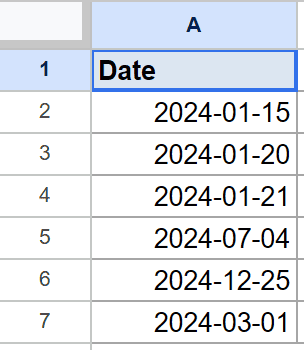
The goal is to get the day-of-week number for each date using the default numbering.
Here is the formula:
=WEEKDAY(A2)
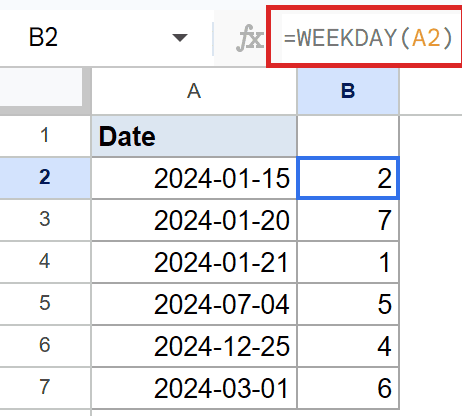
With no type argument, WEEKDAY counts Sunday as 1, Monday as 2, and so on up to Saturday as 7.
January 15, 2024 is a Monday, so it returns 2. January 21, 2024 is a Sunday, which gives 1. The Saturday in the list comes back as 7.
Pro Tip: Pair WEEKDAY with the CHOOSE function to turn the number into a day name: =CHOOSE(WEEKDAY(A2),"Sun","Mon","Tue","Wed","Thu","Fri","Sat").
Example 2: Business-Week Numbering With Type 2
Most work schedules treat Monday as the first day, and type 2 matches that.
Below is the same column of dates in A2 to A7. The only change is the type argument we pass.
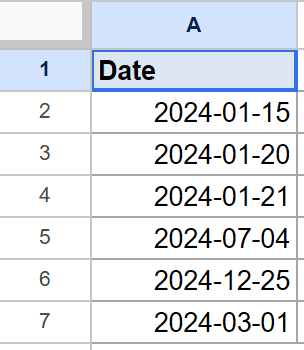
The goal is to number the days so Monday is 1 and Sunday is 7.
Here is the formula:
=WEEKDAY(A2,2)
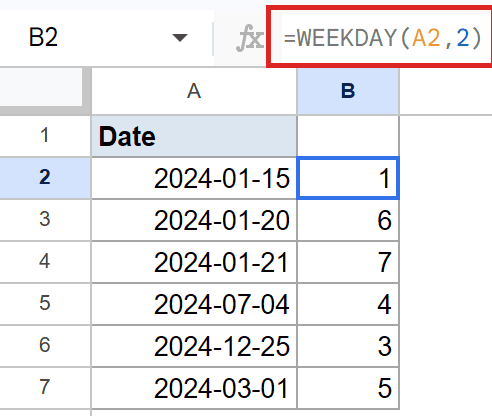
Passing 2 as the type shifts the start of the week to Monday. Now Monday is 1, Tuesday is 2, and Sunday lands at 7.
The Monday in the list returns 1 with this type, while the same date returned 2 under the default. The Saturday comes back as 6 and the Sunday as 7, which makes spotting weekends easy.
Example 3: Day Number for a Directly Typed Date
WEEKDAY works on dates entered straight into the cell, not just cell references.
Below is the dataset, a column of dates in A2 to A6, including a leap day.
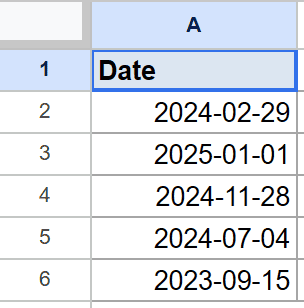
The goal is to get the default day-of-week number for each typed date.
Here is the formula:
=WEEKDAY(A2)
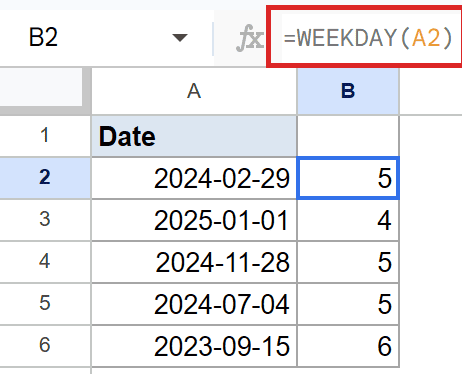
As long as the cell holds a real date, WEEKDAY reads it the same way. The leap day February 29, 2024 is a Thursday, so it returns 5 under the default numbering.
January 1, 2025 is a Wednesday, which comes back as 4. The last date, a Friday, returns 6.
Example 4: Flag Weekend Dates With TRUE or FALSE
Here is where WEEKDAY earns its keep, marking weekends automatically.
Below is the dataset, the same column of dates in A2 to A7.
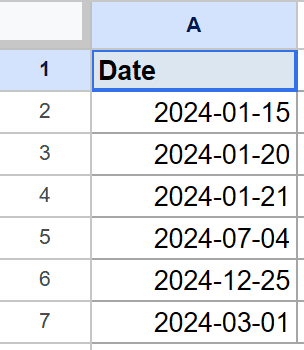
The goal is to return TRUE for weekend dates and FALSE for weekdays.
Here is the formula:
=WEEKDAY(A2,2)>5
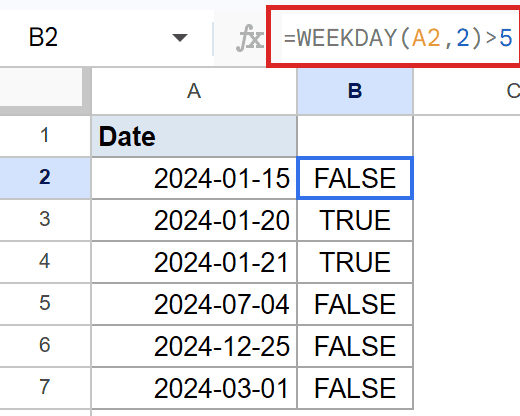
Under type 2, Saturday is 6 and Sunday is 7, so any weekend day scores above 5. The comparison >5 turns that into a simple TRUE or FALSE.
Saturday and Sunday both come back as TRUE here. Every weekday returns FALSE, which is perfect for filtering or conditional formatting.
Pro Tip: Drop this straight into conditional formatting with a custom formula like =WEEKDAY(A2,2)>5 to shade every weekend row in a schedule.
Tips & Common Mistakes
- The type argument changes everything. The default starts the week on Sunday, while type 2 starts it on Monday, so always check which one your formula uses.
- WEEKDAY needs a real date, not text. A date stored as text returns a #VALUE! error, so confirm the cell holds an actual date first.
- Remember the default numbers Sunday as 1, not Monday. If your weekend check looks off, the type argument is usually the culprit.
WEEKDAY turns any date into a day-of-week number you can sort, compare, or test. Switch the type argument to match how you count your week, and weekend flags fall right out of it.
Try it on your own date column and let the numbers do the day-of-week sorting for you.
List of All Google Sheets Functions
Related Google Sheets Functions / Articles: