
The LAMBDA function in Google Sheets lets you build a small reusable formula on the fly. You name the inputs, write what to do with them, and hand the whole thing off to another function to run.
On its own a LAMBDA call just returns a #ERROR! since it’s a definition rather than a computation. Its job is to be passed to helpers like MAP, BYROW, BYCOL, REDUCE, and MAKEARRAY, which call it once for each piece of data.
LAMBDA Function Syntax in Google Sheets
Here is the syntax for the LAMBDA function.
=LAMBDA(name1, [name2, ...], formula_expression)
- name1, name2, … — placeholder names for the inputs your formula will use. You can have up to 252 of them.
- formula_expression — the calculation that uses those names. This is the body of the LAMBDA.
The LAMBDA itself is just the recipe. The helper function around it (MAP, BYROW, BYCOL, REDUCE, MAKEARRAY) supplies the actual values for the names and runs the formula for each one.
When to Use LAMBDA Function
A few common scenarios where LAMBDA earns its keep.
- Applying the same transformation across every cell in a range without copying a formula down.
- Aggregating each row or each column with a single one-line formula.
- Walking through a list and accumulating a running total, count, or concatenation.
- Building a new grid from scratch using row and column indexes as inputs.
- Saving a custom calculation as a Named Function so it can be reused like any built-in formula.
Example 1: Square Every Value With MAP and LAMBDA
Let’s start with MAP, which takes one or more ranges and runs a LAMBDA on every cell.
Below is the dataset with five numbers in column A.
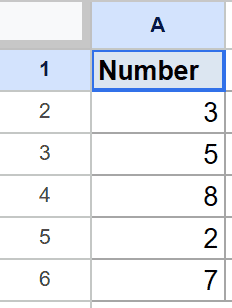
We want to square every number and spill the results into column B.
Here is the formula:
=MAP(A2:A6, LAMBDA(x, x*x))
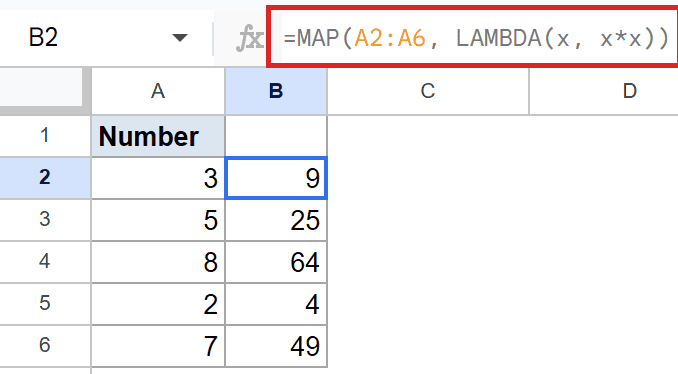
How this formula works:
- MAP walks through
A2:A6one cell at a time. - For each cell, it calls the LAMBDA with that cell’s value bound to the name
x. - The LAMBDA body
x*xsquares the value, and MAP collects all five results into a spilled column.
So 3 becomes 9, 5 becomes 25, 8 becomes 64, and so on down the list.
Example 2: Sum Each Row With BYROW and LAMBDA
BYROW is the row-by-row cousin of MAP. The LAMBDA receives an entire row at a time instead of a single cell.
Below is the dataset with Q1 and Q2 numbers across five rows.
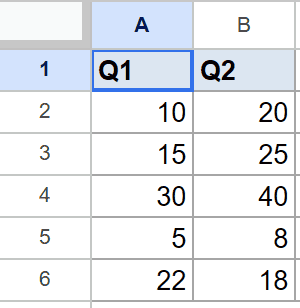
We want the total of each row in a single spilled column.
Here is the formula:
=BYROW(A2:B6, LAMBDA(row, SUM(row)))
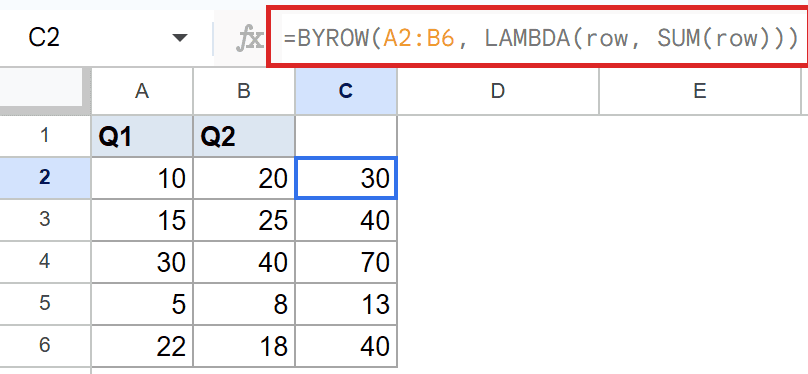
The LAMBDA names its input row, and BYROW hands it one row at a time. Inside the LAMBDA, SUM adds the values across that row, and the per-row totals spill down column C.
The first row (10 and 20) gives 30, the second row (15 and 25) gives 40, and the pattern continues for the rest.
Pro Tip: BYROW is handy because it scales automatically when you add new rows to the source range. No need to drag a formula down or edit anything.
Example 3: Average Each Column With BYCOL and LAMBDA
BYCOL works the same way as BYROW but column by column. Pair it with AVERAGE inside the LAMBDA to get a per-column summary in one go.
Below is the dataset with scores for Math, Science, and English across four students.
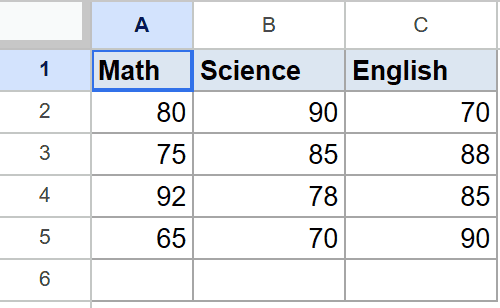
We want the average score for each subject in a single spilled row.
Here is the formula:
=BYCOL(A2:C5, LAMBDA(col, AVERAGE(col)))
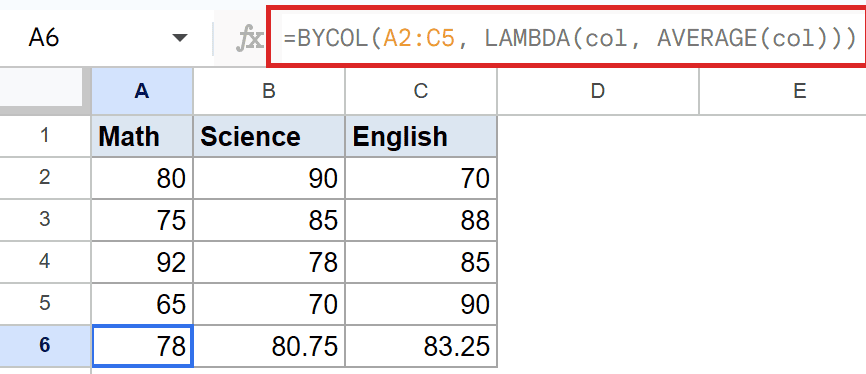
BYCOL hands each subject column to the LAMBDA, AVERAGE inside the LAMBDA collapses it to a single number, and the three averages spill across the row below the data.
Math averages out to 78, Science to 80.75, and English to 83.25, all from one short formula.
Example 4: Build a Running Total With REDUCE and LAMBDA
REDUCE is the helper for boiling a whole range down to a single value. It walks through the range and keeps an accumulator that updates with each step.
Below is the dataset with five numbers in column A.
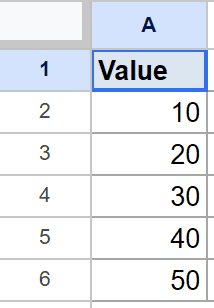
We want the running total of all five numbers in a single cell.
Here is the formula:
=REDUCE(0, A2:A6, LAMBDA(acc, val, acc+val))
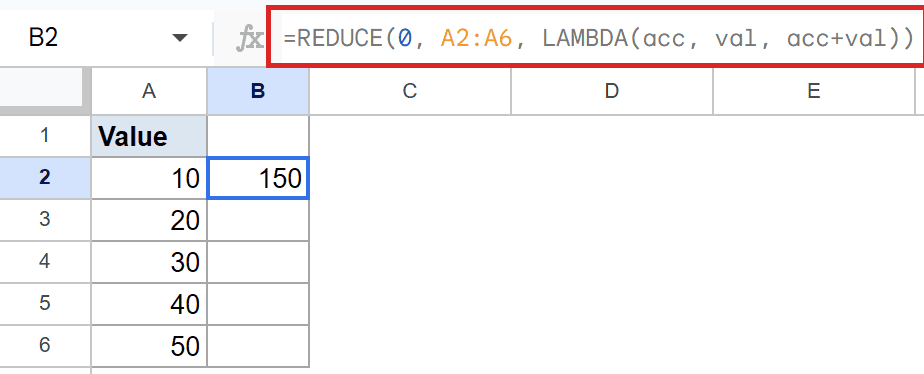
How this formula works:
- REDUCE starts with an initial value of zero, which becomes the first
acc(accumulator). - For each cell in
A2:A6, the LAMBDA receives the currentaccand the next valueval, and returnsacc+val. - After the last step, REDUCE produces 150, the sum of 10 + 20 + 30 + 40 + 50.
You could of course use SUM for this exact task. REDUCE shines when the step is more complex than a plain addition, like multiplying instead of adding, building a string, or counting items that meet a custom condition.
Example 5: Generate a Multiplication Table With MAKEARRAY
MAKEARRAY is the helper that builds a fresh grid from nothing. You tell it how many rows and columns you want, and the LAMBDA you pass in fills each cell based on its row and column index.
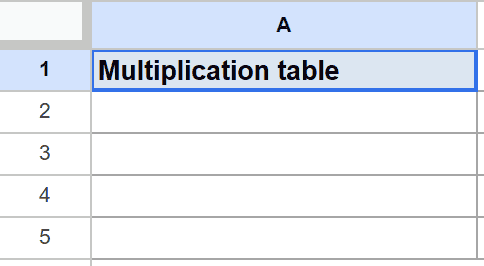
Below is the empty header row in cell A1.
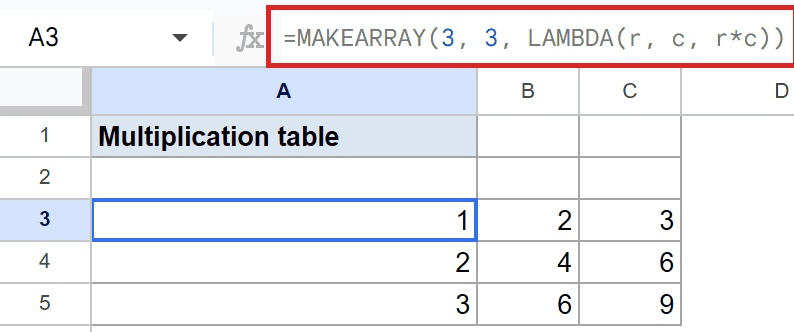
We want a 3×3 multiplication table that spills into the cells below.
Here is the formula:
=MAKEARRAY(3, 3, LAMBDA(r, c, r*c))
How this formula works:
- The first two arguments are the row count and column count for the grid.
- The LAMBDA gets called once per cell with the row index
rand the column indexc. - The body
r*cmultiplies the two indexes, so cell (1,1) becomes 1, cell (2,3) becomes 6, and cell (3,3) becomes 9.
The full 3×3 grid spills from A3 with the multiplication table inside.
Pro Tip: If you find yourself reusing the same LAMBDA across many sheets, save it as a Named Function under Data > Named functions. After that you can call it like any other built-in formula, no need to retype the LAMBDA each time.
Tips & Common Mistakes
- A LAMBDA on its own returns #ERROR!. That’s expected. LAMBDA is a definition, not a call. Always wrap it in MAP, BYROW, BYCOL, REDUCE, MAKEARRAY, or a Named Function so the inputs get supplied.
- Match the name count to the helper. MAP and BYROW pass one input per call, so the LAMBDA needs one name. REDUCE passes two (the accumulator and the current value), so the LAMBDA needs two. MAKEARRAY passes two (row index and column index). A mismatch gives a #N/A or #ERROR! result.
- Don’t expect side effects. A LAMBDA can’t write to other cells or call functions like NOW() in a way that updates across iterations. Treat it as a pure formula: same inputs, same output, every time.
LAMBDA is a small idea that opens up a lot. By itself it just names some inputs, but paired with MAP, BYROW, BYCOL, REDUCE, or MAKEARRAY it replaces dozens of repetitive formulas with one clean line.
The next time you catch yourself dragging the same formula down a thousand rows or stitching together a wall of nested IFs, see if a LAMBDA-based helper does the job in a single cell.
List of All Google Sheets Functions
Related Google Sheets Functions / Articles: