
ACOS converts a cosine value into an angle in radians. Its input must be between negative one and positive one, and its principal result lies between zero and pi.
ACOS function syntax
=ACOS(value)- value: cosine value from -1 through 1.
Set up the example data
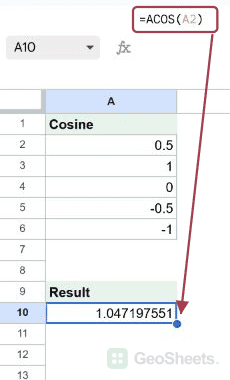
Enter this small dataset starting in A1. The first row contains headers. Keep the formula output separate from the input cells.
| Cosine |
|---|
| 0.5 |
| 1 |
| 0 |
| -0.5 |
| -1 |
Find the angle in radians
Enter this formula in A10. A cosine of 0.5 corresponds to approximately 1.0472 radians. ACOS returns the principal angle, not every angle with that cosine.
=ACOS(A2)Result: 1.047197551.
Convert the angle to degrees
DEGREES converts the radian result to sixty degrees. Keep radians when another trigonometric calculation expects them.
=DEGREES(ACOS(A2))Result: 60.
Use the cosine rule for a triangle
The formula calculates the angle opposite the side of length five in a 3-4-5 triangle. Use positive side lengths that form a valid triangle.
=DEGREES(ACOS((3^2+4^2-5^2)/(2*3*4)))Result: 90.
Check out-of-range input
No real angle has a cosine of two. Investigate invalid geometry or input units rather than hiding the error.
=ACOS(2)Result: #NUM!.
Other Google Sheets articles you may also like