
CONVERT changes a number from one measurement unit to another in Google Sheets. The source and destination must describe the same kind of measurement.
The unit codes are case-sensitive. Use the documented codes, such as kg for kilograms and lbm for pounds of mass, rather than guessing from a familiar abbreviation.
CONVERT function syntax
=CONVERT(value, start_unit, end_unit)- value: the numeric measurement.
- start_unit: the source unit code in quotation marks or a cell reference.
- end_unit: the destination unit code in quotation marks or a cell reference.
The Google CONVERT reference describes the function arguments.
Example data
Enter this dataset starting in A1. Leave cells marked “leave empty” empty; type any displayed formula as a formula. Keep a separate blank area for the results.
| Measure | Value | Units |
|---|---|---|
| Distance | 10 | km |
| Package | 2.5 | kg |
| Temperature | 25 | C |
| Duration | 2.5 | hr |
| Room | 4.5 | m |
The examples below use this dataset unless the formula supplies its own values. Array results need enough empty cells to expand. The formulas use commas as argument separators. Your spreadsheet locale may require semicolons.
Convert kilometers to miles
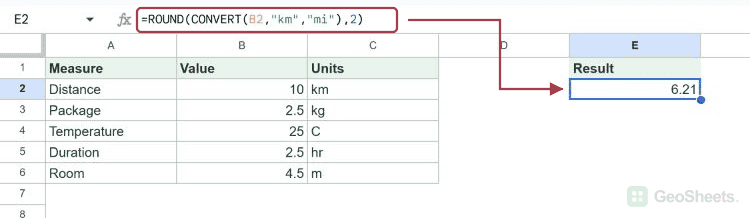
This converts 10 kilometers to miles and rounds the result to two decimal places. ROUND changes the returned precision, not just its display.
=ROUND(CONVERT(B2,"km","mi"),2)Result: 6.21
Convert kilograms to pounds
Use lbm for pounds of mass. The 2.5-kilogram package is about 5.51 pounds after rounding.
=ROUND(CONVERT(B3,"kg","lbm"),2)Result: 5.51
Convert Celsius to Fahrenheit
CONVERT accounts for the temperature offset as well as the scale difference. Twenty-five degrees Celsius equals 77 degrees Fahrenheit.
=CONVERT(B4,"C","F")Result: 77
Convert a duration
The source value 2.5 represents decimal hours, so hr to sec returns 9000 seconds.
=CONVERT(B5,"hr","sec")Result: 9000
A Sheets time value is a fraction of a day. Multiply it by 24 before treating it as decimal hours for this conversion.
=CONVERT(TIME(2,30,0)*24,"hr","min")Result: 150
Convert meters to feet
This room length is 4.5 meters. The rounded result is 14.76 feet.
=ROUND(CONVERT(B6,"m","ft"),2)Result: 14.76
Check incompatible or unsupported codes
Meters and seconds measure different quantities, so CONVERT returns #N/A.
=CONVERT(1,"m","sec")Result: #N/A
A prefix alone is not a complete unit code. M does not identify meters here; use the supported lowercase m code.
=CONVERT(1,"M","ft")Result: #N/A
Other Google Sheets articles you may also like