
When counting rows needs more than one condition, COUNTIFS is the function that handles it. It checks several criteria at once and counts only the rows where all of them are true.
This guide covers five examples, including two conditions, a number range, dates, and three criteria stacked together, so you can match the pattern to your data.
COUNTIFS Function Syntax in Google Sheets
Here is how the COUNTIFS function is structured.
=COUNTIFS(criteria_range1, criterion1, [criteria_range2, criterion2, ...])
- criteria_range1 is the first range you want to test.
- criterion1 is the condition that range has to meet, such as text, a number, or a comparison like
">200". - criteria_range2, criterion2 are optional extra range and condition pairs. You can keep adding pairs to layer on more conditions.
When to Use COUNTIFS Function
- Counting rows that match two or more labels at the same time, like region and status.
- Counting numbers that fall between a lower and an upper bound.
- Counting records inside a date range with a start and end date.
- Mixing text and number conditions in one count.
- Narrowing a count down with three or more conditions.
Example 1: Count Rows Matching Two Conditions
Let’s start with the job COUNTIFS is built for, counting on two conditions at once.
Below is the dataset with an Order column in A, a Region column in B, and a Status column in C for six orders.
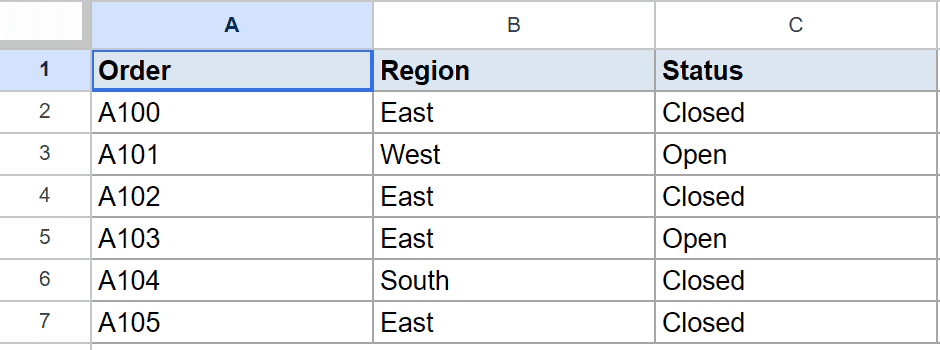
I want to count orders that are both from the East region and marked Closed.
Here is the formula:
=COUNTIFS(B2:B7, "East", C2:C7, "Closed")
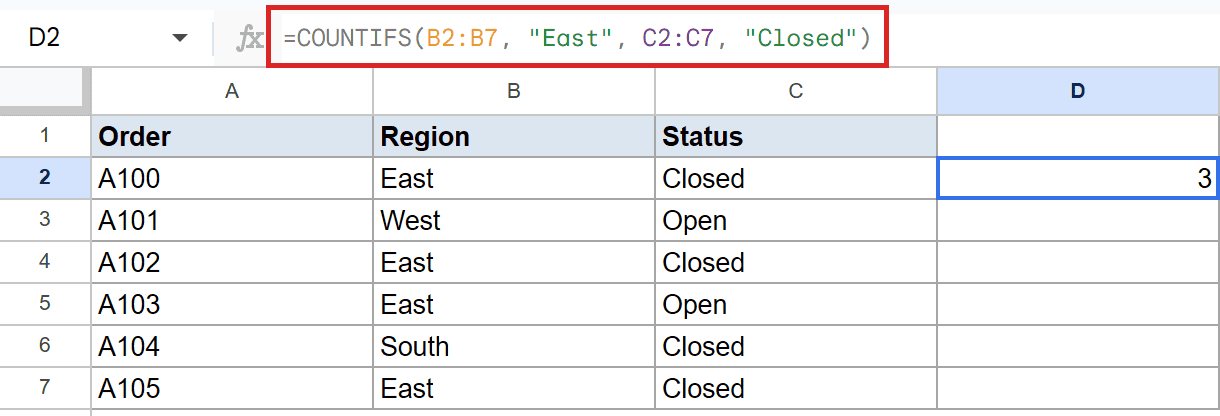
COUNTIFS checks each row against both conditions and counts it only when both are true. A row has to be East and Closed.
Three rows clear both tests, so the formula returns 3. If you only needed one condition, a single-criterion count works fine, and the Count Cells with Text guide covers that case.
Example 2: Count Numbers Within a Range
A neat trick is pointing two conditions at the same column to build a range.
Below is the dataset with an Item column in A and a Qty column in B for six items.
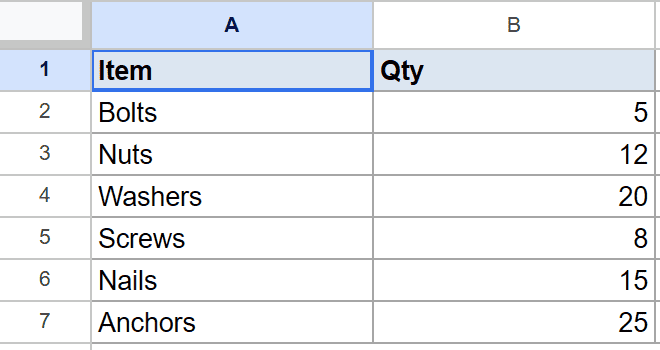
I want to count items with a quantity between 10 and 20, inclusive.
Here is the formula:
=COUNTIFS(B2:B7, ">=10", B2:B7, "<=20")
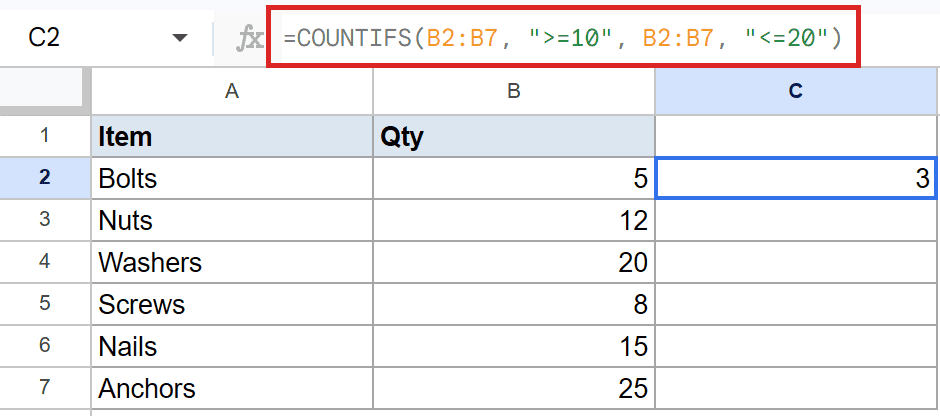
Both criteria ranges point at B2:B7. The first keeps values at 10 or more, the second keeps values at 20 or less, so only quantities in that band survive.
Nuts at 12, Washers at 20, and Nails at 15 all fit, so the result is 3.
Pro Tip: Pointing both conditions at the same column is how you build a between range in COUNTIFS. Use `>=` and `<=` if you want the boundary numbers included, or `>` and `<` to exclude them.
Example 3: Count Entries Inside a Date Range
Dates work the same way as numbers, with one small twist for building the criterion.
Below is the dataset with an Invoice column in A and a Date column in B holding five invoice dates.
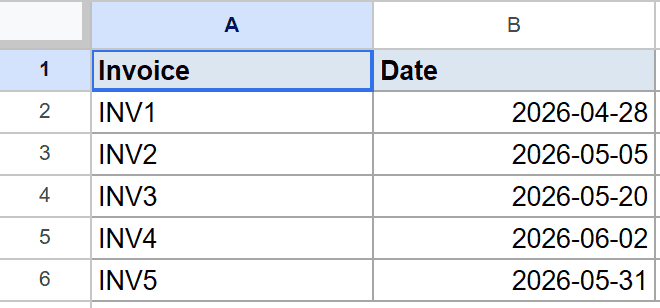
I want to count invoices dated in May 2026.
Here is the formula:
=COUNTIFS(B2:B6, ">="&DATE(2026,5,1), B2:B6, "<="&DATE(2026,5,31))
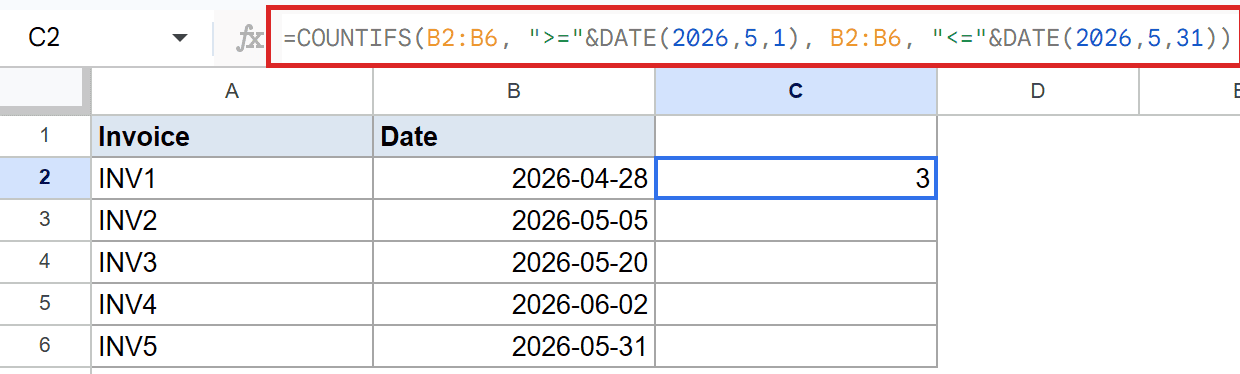
The & joins the operator to the date that DATE builds. This keeps the comparison reliable instead of typing a date as plain text.
The first condition catches anything on or after May 1, the second anything on or before May 31. Three invoices land in May, so the formula returns 3.
Pro Tip: Always build date criteria with the DATE function joined by `&`, not a typed string like `”>=5/1/2026″`. The DATE approach avoids locale and format surprises.
Example 4: Combine a Text and Number Condition
You are not limited to one type of criterion. Text and numbers mix freely.
Below is the dataset with a Rep column in A, a Region column in B, and a Sales column in C for five reps.
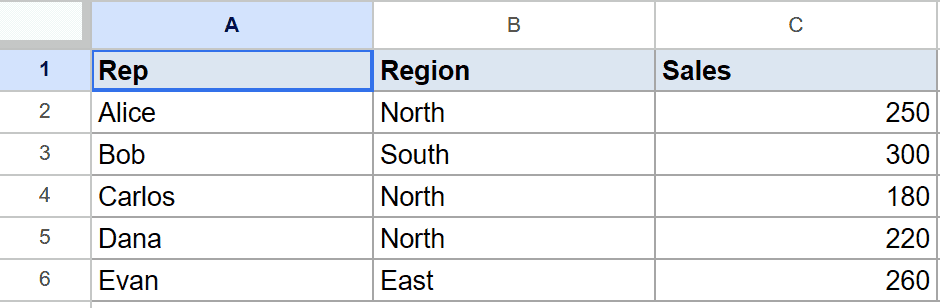
I want to count reps in the North region whose sales were over 200.
Here is the formula:
=COUNTIFS(B2:B6, "North", C2:C6, ">200")
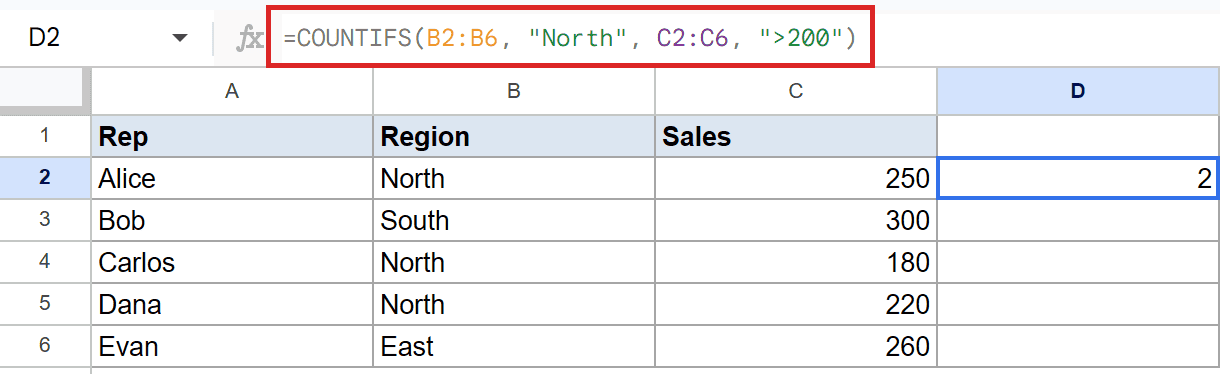
The first pair checks the Region column for North, and the second checks the Sales column for anything above 200. A row needs both to count.
Alice and Dana are both North with sales over 200, so the result is 2. Carlos is North but only sold 180, so he drops out.
Example 5: Count Rows Matching Three Conditions
For the last one, let’s stack a third condition to tighten the count further.
Below is the dataset with a Region column in A, a Product column in B, and a Units column in C for five rows.
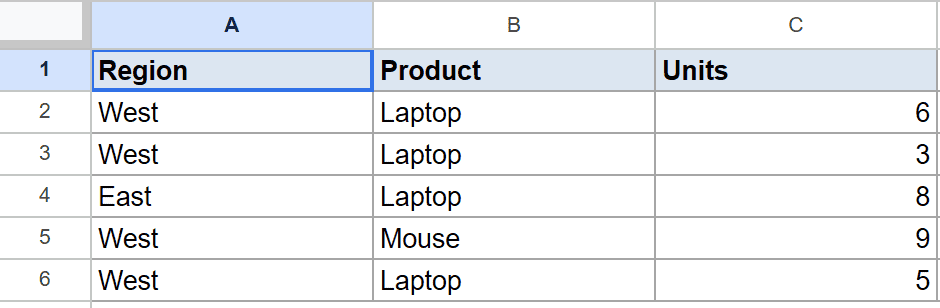
I want to count West region rows where the product is Laptop and units are at least 5.
Here is the formula:
=COUNTIFS(A2:A6, "West", B2:B6, "Laptop", C2:C6, ">=5")
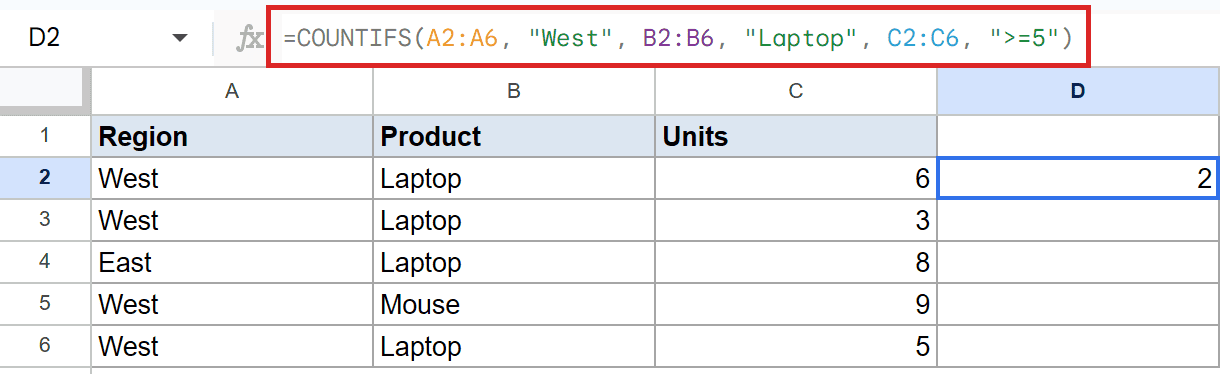
Each criterion narrows the count more. A row has to be West, a Laptop, and have at least 5 units to make the cut.
Two rows pass all three tests, so the formula returns 2. The West Laptop row with only 3 units gets filtered out by the units condition.
Pro Tip: You can keep adding range and criterion pairs for more conditions. When the logic gets complicated, QUERY can be a cleaner alternative for multi-condition counts.
Tips & Common Mistakes
- Every criteria range must be the same size. If one range covers six rows and another covers five, COUNTIFS returns an error.
- Numeric and date criteria need the operator inside quotes, like
">200"or">="&DATE(2026,5,1). For dates, join the operator to a DATE value rather than typing the date as text. - COUNTIFS counts rows where all conditions are true (AND logic). It cannot do OR logic on its own. For OR conditions, add separate COUNTIFS results together or use SUMPRODUCT.
COUNTIFS turns multi-condition counting into one formula. Once two-condition counts, ranges, dates, and three-way filters click, most reporting questions get a one-line answer.
Try these five patterns on your own data and the conditional counts that used to need a filter will take seconds.
List of All Google Sheets Functions
Related Google Sheets Functions / Articles: