
FV calculates a future balance using a constant rate and equal periodic payments. It supports a starting balance, regular contributions, or both. The examples are hypothetical calculations, not return forecasts.
FV function syntax
=FV(rate, number_of_periods, payment_amount, [present_value], [end_or_beginning])- rate: rate per payment period.
- number_of_periods: total periods.
- payment_amount and present_value: cash flows; deposits are negative in these examples.
- end_or_beginning: zero for end-of-period payments, one for beginning.
Set up the example data
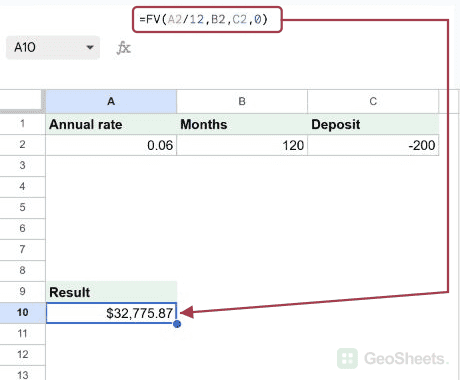
Enter this small dataset starting in A1. The first row contains headers. Keep the formula output separate from the input cells.
| Annual rate | Months | Deposit |
|---|---|---|
| 0.06 | 120 | -200 |
Calculate monthly savings
Enter this formula in A10. At a nominal annual rate of six percent compounded monthly, 120 end-of-month deposits of 200 produce this modeled balance. Format the result as currency.
=FV(A2/12,B2,C2,0)Result: $32,775.87.
Compound a one-time deposit
The rate and periods are annual. Zero periodic payment leaves only the starting deposit to compound.
=FV(0.05,10,0,-10000)Result: $16,288.95.
Combine a balance and contributions
Both deposits are outflows from the saver’s perspective, so both are negative. The future balance is positive.
=FV(0.07/12,240,-300,-5000)Result: $176,471.69.
Compare beginning-of-period contributions
The final one moves each contribution to the beginning of its month, giving it one extra month of modeled growth.
=FV(0.06/12,120,-200,0,1)Result: $32,939.75.
Calculate a zero-interest scenario
With no interest, twelve deposits of 200 plus the starting 1000 total 3400. Change the labeled input cells to compare scenarios.
=FV(0,12,-200,-1000)Result: $3,400.00.
Other Google Sheets articles you may also like