
Use this Google Sheets functions directory to find a formula for the task in front of you. Start with the tested task chooser, then browse the complete category tables.
Each linked function name opens a focused GeoSheets guide. Unlinked names remain useful reference entries, checked against Google’s current function catalogue.
Google Sheets formulas for common tasks
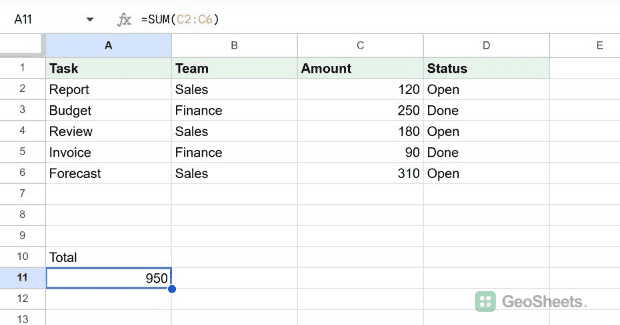
These examples use one small task table with Task, Team, Amount, and Status columns. Every formula and result below was verified in Google Sheets.
| Task | Tested formula | Observed result | Learn more |
|---|---|---|---|
| Add all amounts | =SUM(C2:C6) | 950 | SUM |
| Find the average amount | =AVERAGE(C2:C6) | 190 | AVERAGE |
| Count open tasks | =COUNTIF(D2:D6,"Open") | 3 | COUNTIF |
| Total Sales amounts | =SUMIF(B2:B6,"Sales",C2:C6) | 610 | SUMIF |
| Total open Sales amounts | =SUMIFS(C2:C6,B2:B6,"Sales",D2:D6,"Open") | 610 | SUMIFS |
| Return a decision | =IF(C2>=200,"Review","OK") | OK | IF |
| Look up Budget | =XLOOKUP("Budget",A2:A6,C2:C6,"Not found") | 250 | XLOOKUP |
| Clean extra spaces | =TRIM(" Monthly report ") | Monthly report | TRIM |
| Return open rows | =FILTER(A2:D6,D2:D6="Open") | 3 rows | FILTER |
| List unique teams | =UNIQUE(B2:B6) | Sales; Finance | UNIQUE |
How to enter a formula in Google Sheets
- Select the cell where you want the result.
- Type an equals sign followed by the function and its arguments.
- Press Enter to calculate the formula.
For example, this tested formula adds the five values in C2:C6 and returns 950.
=SUM(C2:C6)A range uses a colon between its first and last cells. Text criteria appear inside quotation marks, as shown in the COUNTIF, SUMIF, SUMIFS, XLOOKUP, and FILTER examples above.
Google Sheets function list by category
The tables preserve the site’s 17 established categories and detailed function links. Choose a category below or scroll through the reference.
- Lookup and Reference
- Math
- Statistical
- Text
- Date and Time
- Logical
- Filter
- Array
- Info
- Financial
- Database
- AI
- Web
- Engineering
- Parser
- Operator
Lookup and Reference
These functions help you find data, navigate ranges, and pull values from one location into another. If you work with large datasets, you’ll live in this section.
| Function | Description |
|---|---|
| ADDRESS | Returns a cell reference as a string. |
| CHOOSE | Returns an element from a list of choices based on an index. |
| COLUMN | Returns the column number of a specified cell. |
| COLUMNS | Returns the number of columns in a specified array or range. |
| FORMULATEXT | Returns the formula as a string. |
| GETPIVOTDATA | Extracts an aggregated value from a pivot table. |
| HLOOKUP | Searches across the first row for a key and returns the matching value. |
| INDEX | Returns the content of a cell at a given row and column offset. |
| INDIRECT | Returns a cell reference specified by a string. |
| LOOKUP | Looks through a row or column for a key and returns the matching value. |
| MATCH | Returns the relative position of an item that matches a specified value. |
| OFFSET | Returns a range reference shifted a specified number of rows and columns. |
| ROW | Returns the row number of a specified cell. |
| ROWS | Returns the number of rows in a specified array or range. |
| SHEET | Returns the sheet number of the specified sheet or reference. |
| VLOOKUP | Searches down the first column for a key and returns the matching value. |
| XLOOKUP | Returns values from a result range based on the position of the matched key. |
Math
The everyday math toolkit. Sums, rounding, trig, and a few specialized helpers for working with numbers.
| Function | Description |
|---|---|
| ABS | Returns the absolute value of a number. |
| ACOS | Returns the inverse cosine of a value, in radians. |
| ACOSH | Returns the inverse hyperbolic cosine of a number. |
| ACOT | Returns the inverse cotangent of a value, in radians. |
| ACOTH | Returns the inverse hyperbolic cotangent of a value, in radians. |
| ASIN | Returns the inverse sine of a value, in radians. |
| ASINH | Returns the inverse hyperbolic sine of a number. |
| ATAN | Returns the inverse tangent of a value, in radians. |
| ATAN2 | Returns the angle between the x-axis and a line segment from the origin. |
| ATANH | Returns the inverse hyperbolic tangent of a number. |
| BASE | Converts a number into a text representation in another base. |
| CEILING | Rounds a number up to the nearest integer multiple of significance. |
| CEILING.MATH | Rounds up to the nearest integer multiple with specified significance. |
| CEILING.PRECISE | Rounds up to the nearest integer multiple of significance. |
| COMBIN | Returns the number of ways to choose objects from a pool. |
| COMBINA | Returns the number of ways to choose objects including repetition. |
| COS | Returns the cosine of an angle provided in radians. |
| COSH | Returns the hyperbolic cosine of any real number. |
| COT | Returns the cotangent of an angle provided in radians. |
| COTH | Returns the hyperbolic cotangent of any real number. |
| COUNTBLANK | Returns the number of empty cells in a given range. |
| COUNTIF | Returns a conditional count across a range. |
| COUNTIFS | Returns the count of a range depending on multiple criteria. |
| COUNTUNIQUE | Counts the number of unique values in a list of values or ranges. |
| CSC | Returns the cosecant of an angle provided in radians. |
| CSCH | Returns the hyperbolic cosecant of any real number. |
| DECIMAL | Converts the text representation of a number in another base to base 10. |
| DEGREES | Converts an angle value in radians to degrees. |
| ERFC | Returns the complementary Gauss error function of a value. |
| ERFC.PRECISE | Returns the complementary Gauss error function of a value. |
| EVEN | Rounds a number up to the nearest even integer. |
| EXP | Returns Euler’s number, e, raised to a power. |
| FACT | Returns the factorial of a number. |
| FACTDOUBLE | Returns the double factorial of a number. |
| FLOOR | Rounds a number down to the nearest integer multiple of significance. |
| FLOOR.MATH | Rounds down to the nearest integer multiple with specified significance. |
| FLOOR.PRECISE | Rounds down to the nearest integer or multiple of significance. |
| GAMMALN | Returns the logarithm of a Gamma function, base e. |
| GAMMALN.PRECISE | Returns the logarithm of a Gamma function, base e. |
| GCD | Returns the greatest common divisor of one or more integers. |
| IMLN | Returns the logarithm of a complex number, base e. |
| IMPOWER | Returns a complex number raised to a power. |
| IMSQRT | Computes the square root of a complex number. |
| INT | Rounds a number down to the nearest integer less than or equal to it. |
| ISEVEN | Checks whether the provided value is even. |
| ISO.CEILING | Rounds up to the nearest integer multiple of significance. |
| ISODD | Checks whether the provided value is odd. |
| LCM | Returns the least common multiple of one or more integers. |
| LN | Returns the logarithm of a number, base e. |
| LOG | Returns the logarithm of a number given a base. |
| LOG10 | Returns the logarithm of a number, base 10. |
| MOD | Returns the remainder after a division operation. |
| MROUND | Rounds one number to the nearest integer multiple of another. |
| MULTINOMIAL | Returns the factorial of the sum divided by the product of factorials. |
| MUNIT | Returns a unit matrix of size dimension by dimension. |
| ODD | Rounds a number up to the nearest odd integer. |
| PI | Returns the value of Pi to 14 decimal places. |
| POWER | Returns a number raised to a power. |
| PRODUCT | Returns the result of multiplying a series of numbers. |
| QUOTIENT | Returns the integer quotient of a division, without the remainder. |
| RADIANS | Converts an angle value in degrees to radians. |
| RAND | Returns a random number between 0 inclusive and 1 exclusive. |
| RANDARRAY | Generates an array of random numbers between 0 and 1. |
| RANDBETWEEN | Returns a uniformly random integer between two values, inclusive. |
| ROUND | Rounds a number to a certain number of decimal places. |
| ROUNDDOWN | Rounds down to a certain number of decimal places. |
| ROUNDUP | Rounds up to a certain number of decimal places. |
| SEC | Returns the secant of an angle, measured in radians. |
| SECH | Returns the hyperbolic secant of an angle. |
| SEQUENCE | Returns an array of sequential numbers such as 1, 2, 3, 4. |
| SERIESSUM | Returns the sum of a power series. |
| SIGN | Returns -1 if negative, 1 if positive, and 0 if zero. |
| SIN | Returns the sine of an angle provided in radians. |
| SINH | Returns the hyperbolic sine of any real number. |
| SQRT | Returns the positive square root of a positive number. |
| SQRTPI | Returns the positive square root of the product of Pi and the number. |
| SUBTOTAL | Returns a subtotal for a vertical range using a specified function. |
| SUM | Returns the sum of a series of numbers or cells. |
| SUMIF | Returns a conditional sum across a range. |
| SUMIFS | Returns the sum of a range depending on multiple criteria. |
| SUMSQ | Returns the sum of the squares of a series of numbers or cells. |
| TAN | Returns the tangent of an angle provided in radians. |
| TANH | Returns the hyperbolic tangent of any real number. |
| TRUNC | Truncates a number to a certain number of significant digits. |
Statistical
Averages, distributions, regressions, and the rest of the statistics shelf. Useful for analysts, researchers, and anyone summarizing data.
| Function | Description |
|---|---|
| AVEDEV | Calculates the average of the magnitudes of deviations from the mean. |
| AVERAGE | Returns the numerical average value in a dataset, ignoring text. |
| AVERAGE.WEIGHTED | Finds the weighted average of a set of values. |
| AVERAGEA | Returns the numerical average value in a dataset. |
| AVERAGEIF | Returns the average of a range depending on criteria. |
| AVERAGEIFS | Returns the average of a range depending on multiple criteria. |
| BETA.DIST | Returns the probability of a given value as defined by the beta distribution. |
| BETA.INV | Returns the value of the inverse beta distribution function. |
| BETADIST | Returns the probability of a given value as defined by the beta distribution. |
| BETAINV | Returns the value of the inverse beta distribution function. |
| BINOM.DIST | Calculates the probability of drawing a certain number of successes. |
| BINOM.INV | Returns the smallest value for which the cumulative distribution is greater than a criterion. |
| BINOMDIST | Calculates the probability of drawing successes with replacement. |
| CHIDIST | Calculates the right-tailed chi-squared distribution. |
| CHIINV | Calculates the inverse of the right-tailed chi-squared distribution. |
| CHISQ.DIST | Calculates the left-tailed chi-squared distribution. |
| CHISQ.DIST.RT | Calculates the right-tailed chi-squared distribution. |
| CHISQ.INV | Calculates the inverse of the left-tailed chi-squared distribution. |
| CHISQ.INV.RT | Calculates the inverse of the right-tailed chi-squared distribution. |
| CHISQ.TEST | Returns the probability associated with a Pearson’s chi-squared test. |
| CHITEST | Returns the probability associated with a Pearson’s chi-squared test. |
| CONFIDENCE | Calculates the width of half the confidence interval. |
| CONFIDENCE.NORM | Calculates the width of half the confidence interval for a normal distribution. |
| CONFIDENCE.T | Calculates the width of half the confidence interval for a Student’s t-distribution. |
| CORREL | Calculates r, the Pearson product-moment correlation coefficient. |
| COUNT | Returns a count of the number of numeric values in a dataset. |
| COUNTA | Returns a count of the number of values in a dataset. |
| COVAR | Calculates the covariance of a dataset. |
| COVARIANCE.P | Calculates the covariance of a dataset treated as a population. |
| COVARIANCE.S | Calculates the covariance of a dataset treated as a sample. |
| CRITBINOM | Calculates the smallest value for which the cumulative binomial distribution is greater than a criterion. |
| DEVSQ | Calculates the sum of squares of deviations based on a sample. |
| EXPON.DIST | Returns the value of the exponential distribution function. |
| EXPONDIST | Returns the value of the exponential distribution function. |
| F.DIST | Calculates the left-tailed F probability distribution. |
| F.DIST.RT | Calculates the right-tailed F probability distribution. |
| F.INV | Calculates the inverse of the left-tailed F probability distribution. |
| F.INV.RT | Calculates the inverse of the right-tailed F probability distribution. |
| F.TEST | Returns the probability associated with an F-test for equality of variances. |
| FDIST | Calculates the right-tailed F probability distribution. |
| FINV | Calculates the inverse of the right-tailed F probability distribution. |
| FISHER | Returns the Fisher transformation of a specified value. |
| FISHERINV | Returns the inverse Fisher transformation of a specified value. |
| FORECAST | Calculates the expected y-value for a specified x based on a linear regression. |
| FORECAST.LINEAR | Calculates the expected y-value for a specified x based on a linear regression. |
| FTEST | Returns the probability associated with an F-test for equality of variances. |
| GAMMA | Returns the Gamma function evaluated at the specified value. |
| GAMMA.DIST | Calculates the gamma distribution. |
| GAMMA.INV | Returns the value of the inverse gamma cumulative distribution function. |
| GAMMADIST | Calculates the gamma distribution. |
| GAMMAINV | Returns the value of the inverse gamma cumulative distribution function. |
| GAUSS | Returns the probability that a random variable will be within a range of the mean. |
| GEOMEAN | Calculates the geometric mean of a dataset. |
| HARMEAN | Calculates the harmonic mean of a dataset. |
| HYPGEOM.DIST | Calculates the probability of drawing successes without replacement. |
| HYPGEOMDIST | Calculates the probability of drawing successes without replacement. |
| INTERCEPT | Calculates the y-value where the regression line intersects the y-axis. |
| KURT | Calculates the kurtosis of a dataset. |
| LARGE | Returns the nth largest element from a dataset. |
| LOGINV | Returns the value of the inverse log-normal cumulative distribution. |
| LOGNORM.DIST | Returns the value of the log-normal cumulative distribution. |
| LOGNORM.INV | Returns the value of the inverse log-normal cumulative distribution. |
| LOGNORMDIST | Returns the value of the log-normal cumulative distribution. |
| MARGINOFERROR | Calculates the amount of random sampling error given a range of values. |
| MAX | Returns the maximum value in a numeric dataset. |
| MAXA | Returns the maximum numeric value in a dataset, treating text as 0. |
| MAXIFS | Returns the maximum value in a range filtered by criteria. |
| MEDIAN | Returns the median value in a numeric dataset. |
| MIN | Returns the minimum value in a numeric dataset. |
| MINA | Returns the minimum numeric value in a dataset, treating text as 0. |
| MINIFS | Returns the minimum value in a range filtered by criteria. |
| MODE | Returns the most commonly occurring value in a dataset. |
| MODE.MULT | Returns the most commonly occurring values in a dataset. |
| MODE.SNGL | Returns the most commonly occurring value in a dataset. |
| NEGBINOM.DIST | Calculates the probability of drawing failures before successes. |
| NEGBINOMDIST | Calculates the probability of drawing failures before successes. |
| NORM.DIST | Returns the value of the normal distribution function. |
| NORM.INV | Returns the value of the inverse normal distribution function. |
| NORM.S.DIST | Returns the value of the standard normal cumulative distribution. |
| NORM.S.INV | Returns the value of the inverse standard normal distribution. |
| NORMDIST | Returns the value of the normal distribution function. |
| NORMINV | Returns the value of the inverse normal distribution function. |
| NORMSDIST | Returns the value of the standard normal cumulative distribution. |
| NORMSINV | Returns the value of the inverse standard normal distribution. |
| PEARSON | Calculates r, the Pearson product-moment correlation coefficient. |
| PERCENTILE | Returns the value at a given percentile of a dataset. |
| PERCENTILE.EXC | Returns the value at a percentile exclusive of 0 and 1. |
| PERCENTILE.INC | Returns the value at a given percentile of a dataset. |
| PERCENTRANK | Returns the percentage rank of a specified value. |
| PERCENTRANK.EXC | Returns the percentage rank from 0 to 1, exclusive. |
| PERCENTRANK.INC | Returns the percentage rank from 0 to 1, inclusive. |
| PERMUT | Returns the number of ways to choose objects, considering order. |
| PERMUTATIONA | Returns the number of permutations with replacement. |
| PHI | Returns the value of the normal distribution with mean 0 and standard deviation 1. |
| POISSON | Returns the value of the Poisson distribution function. |
| POISSON.DIST | Returns the value of the Poisson distribution function. |
| PROB | Calculates the probability that a value falls between two limits. |
| QUARTILE | Returns a value nearest to a specified quartile. |
| QUARTILE.EXC | Returns the value nearest to a quartile, exclusive of 0 and 4. |
| QUARTILE.INC | Returns a value nearest to a specified quartile. |
| RANK | Returns the rank of a specified value in a dataset. |
| RANK.AVG | Returns the rank of a value; if tied, returns the average rank of the entries. |
| RANK.EQ | Returns the rank of a value; if tied, returns the top rank of the entries. |
| RSQ | Calculates the square of r, the Pearson product-moment correlation. |
| SKEW | Calculates the skewness of a dataset. |
| SKEW.P | Calculates the skewness of a dataset representing the entire population. |
| SLOPE | Calculates the slope of the line resulting from linear regression. |
| SMALL | Returns the nth smallest element from a dataset. |
| STANDARDIZE | Calculates the normalized equivalent of a random variable. |
| STDEV | Calculates the standard deviation based on a sample. |
| STDEV.P | Calculates the standard deviation based on an entire population. |
| STDEV.S | Calculates the standard deviation based on a sample. |
| STDEVA | Calculates standard deviation based on a sample, treating text as 0. |
| STDEVP | Calculates the standard deviation based on an entire population. |
| STDEVPA | Calculates standard deviation based on a population, treating text as 0. |
| STEYX | Calculates the standard error of the predicted y-value. |
| T.DIST | Returns the right-tailed Student distribution for a value x. |
| T.DIST.2T | Returns the two-tailed Student distribution for a value x. |
| T.DIST.RT | Returns the right-tailed Student distribution for a value x. |
| T.INV | Calculates the negative inverse of the one-tailed TDIST function. |
| T.INV.2T | Calculates the inverse of the two-tailed TDIST function. |
| T.TEST | Returns the probability associated with Student’s t-test. |
| TDIST | Calculates the probability for Student’s t-distribution. |
| TINV | Calculates the inverse of the two-tailed TDIST function. |
| TRIMMEAN | Calculates the mean excluding some proportion from the ends of the data. |
| TTEST | Returns the probability associated with Student’s t-test. |
| VAR | Calculates the variance based on a sample. |
| VAR.P | Calculates the variance based on an entire population. |
| VAR.S | Calculates the variance based on a sample. |
| VARA | Calculates an estimate of variance based on a sample. |
| VARP | Calculates the variance based on an entire population. |
| VARPA | Calculates variance based on a population, treating text as 0. |
| WEIBULL | Returns the value of the Weibull distribution function. |
| WEIBULL.DIST | Returns the value of the Weibull distribution function. |
| Z.TEST | Returns the one-tailed P-value of a Z-test. |
| ZTEST | Returns the one-tailed P-value of a Z-test. |
Text
Functions for working with strings. Cleaning, splitting, joining, searching, formatting, and pattern matching.
| Function | Description |
|---|---|
| ARABIC | Computes the value of a Roman numeral. |
| ASC | Converts full-width ASCII and katakana characters to half-width counterparts. |
| CHAR | Converts a number into a character according to the Unicode table. |
| CLEAN | Returns text with non-printable ASCII characters removed. |
| CODE | Returns the numeric Unicode map value of the first character. |
| CONCATENATE | Appends strings to one another. |
| DOLLAR | Formats a number into the locale-specific currency format. |
| EXACT | Tests whether two strings are identical. |
| FIND | Returns the position at which a string is first found within text. |
| FINDB | Returns the position counting each double-character as 2. |
| FIXED | Formats a number with a fixed number of decimal places. |
| JOIN | Concatenates elements of arrays using a specified delimiter. |
| LEFT | Returns a substring from the beginning of a specified string. |
| LEFTB | Returns the left portion of a string up to a certain number of bytes. |
| LEN | Returns the length of a string. |
| LENB | Returns the length of a string in bytes. |
| LOWER | Converts a specified string to lowercase. |
| MID | Returns a segment of a string. |
| MIDB | Returns a section of a string up to a specified number of bytes. |
| PROPER | Capitalizes each word in a specified string. |
| REGEXEXTRACT | Extracts matching substrings according to a regular expression. |
| REGEXMATCH | Returns whether a piece of text matches a regular expression. |
| REGEXREPLACE | Replaces part of a text using regular expressions. |
| REPLACE | Replaces part of a text string with a different text string. |
| REPLACEB | Replaces part of text based on a number of bytes. |
| REPT | Returns specified text repeated a number of times. |
| RIGHT | Returns a substring from the end of a specified string. |
| RIGHTB | Returns the right portion of a string up to a certain number of bytes. |
| ROMAN | Formats a number in Roman numerals. |
| SEARCH | Returns the position at which a string is first found within text, ignoring case. |
| SEARCHB | Returns the position counting each double-character as 2. |
| SPLIT | Divides text around a specified character or string. |
| SUBSTITUTE | Replaces existing text with new text in a string. |
| T | Returns string arguments as text. |
| TEXT | Converts a number into text according to a specified format. |
| TEXTJOIN | Combines text from multiple strings with a specifiable delimiter. |
| TRIM | Removes leading, trailing, and repeated regular spaces in text. |
| UNICHAR | Returns the Unicode character for a number. |
| UNICODE | Returns the decimal Unicode value of the first character. |
| UPPER | Converts a specified string to uppercase. |
| VALUE | Converts a string in date, time, or number format to a number. |
Date and Time
Anything involving dates, times, weekdays, and working-day calculations.
| Function | Description |
|---|---|
| DATE | Converts a provided year, month, and day into a date. |
| DATEDIF | Calculates the number of days, months, or years between two dates. |
| DATEVALUE | Converts a provided date string in a known format to a date value. |
| DAY | Returns the day of the month that a specific date falls on, in numeric format. |
| DAYS | Returns the number of days between two dates. |
| DAYS360 | Returns the difference between two days based on the 360-day year. |
| EDATE | Returns a date a specified number of months before or after another date. |
| EOMONTH | Returns a date representing the last day of a month. |
| EPOCHTODATE | Converts a Unix epoch timestamp to a datetime in UTC. |
| HOUR | Returns the hour component of a specific time, in numeric format. |
| ISOWEEKNUM | Returns the number of the ISO week of the year. |
| MINUTE | Returns the minute component of a specific time, in numeric format. |
| MONTH | Returns the month of the year a specific date falls in. |
| NETWORKDAYS | Returns the number of net working days between two provided days. |
| NETWORKDAYS.INTL | Returns net working days excluding specified weekend days and holidays. |
| NOW | Returns the current date and time as a date value. |
| SECOND | Returns the second component of a specific time, in numeric format. |
| TIME | Converts a provided hour, minute, and second into a time. |
| TIMEVALUE | Returns the fraction of a 24-hour day the time represents. |
| TODAY | Returns the current date as a date value. |
| WEEKDAY | Returns a number representing the day of the week of the date provided. |
| WEEKNUM | Returns a number representing the week of the year. |
| WORKDAY | Calculates the end date after a specified number of working days. |
| WORKDAY.INTL | Calculates the date after specified workdays, excluding weekends and holidays. |
| YEAR | Returns the year specified by a given date. |
| YEARFRAC | Returns the number of years between two dates using a day count convention. |
Logical
True or false, if-then-else, and the building blocks of decision logic. Includes LAMBDA and LET for advanced formula authoring.
| Function | Description |
|---|---|
| AND | Returns TRUE if all provided arguments are logically true. |
| FALSE | Returns the logical value FALSE. |
| IF | Returns one value if an expression is TRUE and another if FALSE. |
| IFERROR | Returns the first argument if not an error; otherwise returns the second. |
| IFNA | Evaluates a value; if #N/A, returns the specified value. |
| IFS | Evaluates multiple conditions and returns a value for the first true condition. |
| LAMBDA | Creates and returns a custom function with a set of names and a formula expression. |
| LET | Assigns names with value expressions and returns the result of a formula expression. |
| NOT | Returns the opposite of a logical value. |
| OR | Returns TRUE if any provided argument is logically true. |
| SWITCH | Tests an expression against cases and returns the corresponding value. |
| TRUE | Returns the logical value TRUE. |
| XOR | Performs exclusive OR, returning 1 if numbers differ and 0 otherwise. |
Filter
A small but powerful group for filtering, sorting, and deduplicating data.
| Function | Description |
|---|---|
| FILTER | Returns a filtered version of the source range, including only rows or columns that meet conditions. |
| SORT | Sorts the rows of a given array or range by the values in one or more columns. |
| SORTN | Returns the first n items in a dataset after performing a sort. |
| UNIQUE | Returns unique rows in the provided source range, discarding duplicates. |
Array
Modern array helpers. Reshape arrays, apply LAMBDA functions across them, stack and split ranges, and run matrix operations.
| Function | Description |
|---|---|
| ARRAY_CONSTRAIN | Constrains an array result to a specified size. |
| BYCOL | Groups an array by columns by applying a LAMBDA function to each column. |
| BYROW | Groups an array by rows by applying a LAMBDA function to each row. |
| CHOOSECOLS | Creates a new array from the selected columns of an existing range. |
| CHOOSEROWS | Creates a new array from the selected rows of an existing range. |
| FLATTEN | Flattens all values from one or more ranges into a single column. |
| FREQUENCY | Calculates the frequency distribution of a one-column array into specified classes. |
| GROWTH | Fits an exponential growth trend and predicts further values. |
| HSTACK | Appends ranges horizontally to return a larger array. |
| LINEST | Calculates parameters about an ideal linear trend using least squares. |
| LOGEST | Calculates parameters about the best fit exponential growth curve. |
| MAKEARRAY | Returns an array with values calculated by a LAMBDA function. |
| MAP | Maps each value in arrays to a new value by applying a LAMBDA function. |
| MDETERM | Returns the matrix determinant of a square matrix. |
| MINVERSE | Returns the multiplicative inverse of a square matrix. |
| MMULT | Calculates the matrix product of two matrices. |
| REDUCE | Reduces an array to an accumulated result by applying a LAMBDA function. |
| SCAN | Scans an array and produces intermediate values by applying a LAMBDA function. |
| SUMPRODUCT | Calculates the sum of products of corresponding entries in equally-sized ranges. |
| SUMX2MY2 | Calculates the sum of differences of the squares of values in two arrays. |
| SUMX2PY2 | Calculates the sum of the sums of the squares of values in two arrays. |
| SUMXMY2 | Calculates the sum of the squares of differences of values in two arrays. |
| TOCOL | Transforms an array or range into a single column. |
| TOROW | Transforms an array or range into a single row. |
| TRANSPOSE | Transposes the rows and columns of an array or range. |
| TREND | Fits an ideal linear trend using least squares to predict future values. |
| VSTACK | Appends ranges vertically to return a larger array. |
| WRAPCOLS | Wraps cells by columns after a specified number of elements. |
| WRAPROWS | Wraps cells by rows after a specified number of elements. |
Info
Inspect what’s in a cell. Type checks, error checks, and metadata about the spreadsheet itself.
| Function | Description |
|---|---|
| CELL | Returns the requested information about the specified cell. |
| ERROR.TYPE | Returns a number corresponding to the error value in a different cell. |
| ISBLANK | Checks whether the referenced cell is empty. |
| ISDATE | Returns whether a value is a date. |
| ISEMAIL | Checks whether a value is a valid email address. |
| ISERR | Checks whether a value is an error other than #N/A. |
| ISERROR | Checks whether a value is an error. |
| ISFORMULA | Checks whether a formula is in the referenced cell. |
| ISLOGICAL | Checks whether a value is TRUE or FALSE. |
| ISNA | Checks whether a value is the error #N/A. |
| ISNONTEXT | Checks whether a value is non-textual. |
| ISNUMBER | Checks whether a value is a number. |
| ISREF | Checks whether a value is a valid cell reference. |
| ISTEXT | Checks whether a value is text. |
| N | Returns the argument provided as a number. |
| NA | Returns the “value not available” error #N/A. |
| SHEETS | Returns the total number of sheets in the referenced spreadsheet. |
| TYPE | Returns a number associated with the type of data passed into the function. |
Financial
Loans, investments, depreciation, securities, and the rest of the finance department.
| Function | Description |
|---|---|
| ACCRINT | Calculates the accrued interest of a security with periodic payments. |
| ACCRINTM | Calculates the accrued interest of a security paying at maturity. |
| AMORLINC | Returns the depreciation for an accounting period. |
| COUPDAYBS | Calculates the number of days from the first coupon until settlement. |
| COUPDAYS | Calculates the number of days in the coupon period. |
| COUPDAYSNC | Calculates the number of days from settlement until the next coupon. |
| COUPNCD | Calculates the next coupon date after the settlement date. |
| COUPNUM | Calculates the number of coupons between settlement and maturity. |
| COUPPCD | Calculates the last coupon date before the settlement date. |
| CUMIPMT | Calculates cumulative interest over a range of payment periods. |
| CUMPRINC | Calculates cumulative principal paid over a range of payment periods. |
| DB | Calculates depreciation using the arithmetic declining balance method. |
| DDB | Calculates depreciation using the double-declining balance method. |
| DISC | Calculates the discount rate of a security based on price. |
| DOLLARDE | Converts a price quotation given as a decimal fraction into a decimal value. |
| DOLLARFR | Converts a price quotation given as a decimal value into a decimal fraction. |
| DURATION | Calculates the Macaulay duration of a security paying periodic interest, based on its expected yield. |
| EFFECT | Calculates the annual effective interest rate. |
| FV | Calculates the future value of an annuity investment. |
| FVSCHEDULE | Calculates the future value based on a series of variable interest rates. |
| INTRATE | Calculates the effective interest rate from purchase and sale prices. |
| IPMT | Calculates the payment on interest for an investment. |
| IRR | Calculates the internal rate of return on an investment. |
| ISPMT | Calculates the interest paid during a particular period of an investment. |
| MDURATION | Calculates the modified Macaulay duration of a security. |
| MIRR | Calculates the modified internal rate of return on an investment. |
| NOMINAL | Calculates the annual nominal interest rate. |
| NPER | Calculates the number of payment periods for an investment. |
| NPV | Calculates the net present value of an investment. |
| PDURATION | Returns the number of periods required for an investment to reach a value. |
| PMT | Calculates the periodic payment for an annuity investment. |
| PPMT | Calculates the payment on the principal of an investment. |
| PRICE | Calculates the price of a security paying periodic interest. |
| PRICEDISC | Calculates the price of a discount security. |
| PRICEMAT | Calculates the price of a security paying interest at maturity. |
| PV | Calculates the present value of an annuity investment. |
| RATE | Calculates the interest rate of an annuity investment. |
| RECEIVED | Calculates the amount received at maturity for an investment. |
| RRI | Returns the interest rate needed for an investment to reach a value. |
| SLN | Calculates depreciation using the straight-line method. |
| SYD | Calculates depreciation using the sum-of-years digits method. |
| TBILLEQ | Calculates the equivalent annualized rate of a US Treasury Bill. |
| TBILLPRICE | Calculates the price of a US Treasury Bill. |
| TBILLYIELD | Calculates the yield of a US Treasury Bill based on price. |
| VDB | Returns the depreciation of an asset for a particular period. |
| XIRR | Calculates the internal rate of return based on irregularly spaced cash flows. |
| XNPV | Calculates the net present value based on irregularly spaced cash flows. |
| YIELD | Calculates the annual yield of a security paying periodic interest. |
| YIELDDISC | Calculates the annual yield of a discount security. |
| YIELDMAT | Calculates the annual yield of a security paying interest at maturity. |
Database
A small set of “D” functions for querying a table-style range using criteria, similar to a mini SQL.
| Function | Description |
|---|---|
| DAVERAGE | Returns the average of values from a database table-like array. |
| DCOUNT | Counts numeric values from a database table-like array. |
| DCOUNTA | Counts values including text from a database table-like array. |
| DGET | Returns a single value from a database table-like array. |
| DMAX | Returns the maximum value from a database table-like array. |
| DMIN | Returns the minimum value from a database table-like array. |
| DPRODUCT | Returns the product of values from a database table-like array. |
| DSTDEV | Returns the standard deviation of a sample from a database array. |
| DSTDEVP | Returns the standard deviation of a population from a database array. |
| DSUM | Returns the sum of values from a database table-like array. |
| DVAR | Returns the variance of a sample from a database table-like array. |
| DVARP | Returns the variance of a population from a database table-like array. |
Functions unique to Google Sheets. These pull in external data, translate text, render images, and run powerful queries with QUERY.
| Function | Description |
|---|---|
| ARRAYFORMULA | Enables display of array formula values across multiple rows or columns. |
| DETECTLANGUAGE | Identifies the language used in text within a specified range. |
| GOOGLEFINANCE | Fetches current or historical securities information from Google Finance. |
| GOOGLETRANSLATE | Translates text from one language into another. |
| IMAGE | Inserts an image into a cell. |
| QUERY | Runs a Google Visualization API Query Language query across data. |
| SPARKLINE | Creates a miniature chart contained within a single cell. |
AI
The AI function can generate, summarize, categorize, and retrieve text. Availability depends on an eligible Workspace plan, administrator settings, and language settings.
| Function | Description |
|---|---|
| AI | Generates text from a prompt and an optional range. Access and generation limits depend on the account. |
Web
Pull data from the web into your spreadsheet, or work with URLs and feeds.
| Function | Description |
|---|---|
| ENCODEURL | Encodes a string of text for use in a URL query. |
| HYPERLINK | Creates a hyperlink inside a cell. |
| IMPORTDATA | Imports data at a given URL in .csv or .tsv format. |
| IMPORTFEED | Imports an RSS or ATOM feed. |
| IMPORTHTML | Imports data from a table or list within an HTML page. |
| IMPORTRANGE | Imports a range of cells from a specified spreadsheet. |
| IMPORTXML | Imports data from structured data types including XML and RSS. |
| ISURL | Checks whether a value is a valid URL. |
Engineering
Number-base conversions, bitwise operations, and a full suite of complex-number functions.
| Function | Description |
|---|---|
| BIN2DEC | Converts a signed binary number to decimal format. |
| BIN2HEX | Converts a signed binary number to signed hexadecimal format. |
| BIN2OCT | Converts a signed binary number to signed octal format. |
| BITAND | Bitwise boolean AND of two numbers. |
| BITLSHIFT | Shifts the bits of the input a certain number of places to the left. |
| BITOR | Bitwise boolean OR of two numbers. |
| BITRSHIFT | Shifts the bits of the input a certain number of places to the right. |
| BITXOR | Bitwise XOR (exclusive OR) of two numbers. |
| COMPLEX | Creates a complex number given real and imaginary coefficients. |
| DEC2BIN | Converts a decimal number to signed binary format. |
| DEC2HEX | Converts a decimal number to signed hexadecimal format. |
| DEC2OCT | Converts a decimal number to signed octal format. |
| DELTA | Compares two numeric values, returning 1 if they are equal. |
| ERF | Returns the integral of the Gauss error function over an interval. |
| ERF.PRECISE | Returns the integral of the Gauss error function over an interval. |
| GESTEP | Returns 1 if a rate is greater than or equal to a step value. |
| HEX2BIN | Converts a signed hexadecimal number to signed binary format. |
| HEX2DEC | Converts a signed hexadecimal number to decimal format. |
| HEX2OCT | Converts a signed hexadecimal number to signed octal format. |
| IMABS | Returns the absolute value of a complex number. |
| IMAGINARY | Returns the imaginary coefficient of a complex number. |
| IMARGUMENT | Returns the angle of the given complex number in radians. |
| IMCONJUGATE | Returns the complex conjugate of a number. |
| IMCOS | Returns the cosine of the given complex number. |
| IMCOSH | Returns the hyperbolic cosine of the given complex number. |
| IMCOT | Returns the cotangent of the given complex number. |
| IMCOTH | Returns the hyperbolic cotangent of the given complex number. |
| IMCSC | Returns the cosecant of the given complex number. |
| IMCSCH | Returns the hyperbolic cosecant of the given complex number. |
| IMDIV | Returns one complex number divided by another. |
| IMEXP | Returns Euler’s number, e, raised to a complex power. |
| IMLOG | Returns the logarithm of a complex number for a specified base. |
| IMLOG10 | Returns the logarithm of a complex number with base 10. |
| IMLOG2 | Returns the logarithm of a complex number with base 2. |
| IMPRODUCT | Returns the result of multiplying a series of complex numbers. |
| IMREAL | Returns the real coefficient of a complex number. |
| IMSEC | Returns the secant of the given complex number. |
| IMSECH | Returns the hyperbolic secant of the given complex number. |
| IMSIN | Returns the sine of the given complex number. |
| IMSINH | Returns the hyperbolic sine of the given complex number. |
| IMSUB | Returns the difference between two complex numbers. |
| IMSUM | Returns the sum of a series of complex numbers. |
| IMTAN | Returns the tangent of the given complex number. |
| IMTANH | Returns the hyperbolic tangent of the given complex number. |
| OCT2BIN | Converts a signed octal number to signed binary format. |
| OCT2DEC | Converts a signed octal number to decimal format. |
| OCT2HEX | Converts a signed octal number to signed hexadecimal format. |
Parser
Quick converters between numbers, dates, percentages, dollars, and pure text.
| Function | Description |
|---|---|
| CONVERT | Converts a numeric value to a different unit of measure. |
| TO_DATE | Converts a provided number to a date. |
| TO_DOLLARS | Converts a provided number to a dollar value. |
| TO_PERCENT | Converts a provided number to a percentage. |
| TO_PURE_NUMBER | Converts formatted values to a pure number without formatting. |
| TO_TEXT | Converts a provided numeric value to a text value. |
Operator
Google Sheets also exposes arithmetic and comparison operations as named functions, such as ADD, MULTIPLY, EQ, GT, and LT. These are alternatives to the usual operator symbols.
| Function | Description |
|---|---|
| ADD | Returns the sum of two numbers. |
| CONCAT | Returns the concatenation of two values. |
| DIVIDE | Returns one number divided by another, equivalent to the / operator. |
| EQ | Returns TRUE if two specified values are equal. |
| GT | Returns TRUE if the first argument is strictly greater than the second. |
| GTE | Returns TRUE if the first argument is greater than or equal to the second. |
| ISBETWEEN | Checks whether a number is between two other numbers. |
| LT | Returns TRUE if the first argument is strictly less than the second. |
| LTE | Returns TRUE if the first argument is less than or equal to the second. |
| MINUS | Returns the difference of two numbers. |
| MULTIPLY | Returns the product of two numbers. |
| NE | Returns TRUE if two specified values are not equal. |
| POW | Returns a number raised to a power. |
| UMINUS | Returns a number with the sign reversed. |
| UNARY_PERCENT | Returns a value interpreted as a percentage. |
| UPLUS | Returns a specified number, unchanged. |
Other Google Sheets articles you may also like