
ACOSH returns the nonnegative number whose hyperbolic cosine equals the input. Use a numeric value of at least 1. It is different from ACOS, the ordinary inverse cosine.
ACOSH function syntax
=ACOSH(value)- value: the number whose inverse hyperbolic cosine you want.
- The real-input domain starts at 1. Values below 1 return #NUM!.
- ACOSH(1) returns 0. The output is a hyperbolic parameter, not an ordinary circle angle.
Set up the example data
Enter this dataset starting in A1. The first row contains headings. Keep the result area separate from the source table.
| Value |
|---|
| 1 |
| 1.5 |
| 2 |
| 3 |
| 10 |
Calculate inverse hyperbolic cosine
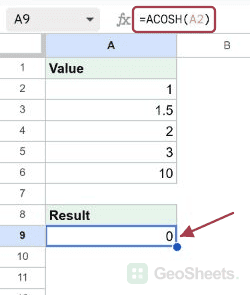
Enter this formula in A9. The value 1 in A2 returns 0 because COSH(0) is 1. For 1.5 in A3, ACOSH returns approximately 0.962424.
=ACOSH(A2)Result: 0.
Process a column with one formula
ARRAYFORMULA processes A2:A6 together, producing five results. Keep the output range empty and exclude the Value heading from the calculation.
=ARRAYFORMULA(ACOSH(A2:A6))Result (rounded for display): 0.0; 0.962424; 1.316958; 1.762747; 2.993223.
Check the boundary at 1
The input 1.001 is just above the smallest valid input. Its result is approximately 0.044718. An input below 1, such as 0.5, gives #NUM! rather than a real result.
=ACOSH(1.001)Result (rounded for display): 0.044718.
Guard inputs below the allowed minimum
This IF checks the numeric value before calling ACOSH. With 0.5, it returns the explanatory label instead of producing the domain error.
=IF(0.5>=1,ACOSH(0.5),"Input must be at least 1")Result: Input must be at least 1.
Round a result for presentation
For 1.5 in A3, rounding the inverse hyperbolic cosine to four decimal places returns 0.9624. Use a number format instead when later calculations should retain the full value.
=ROUND(ACOSH(A3),4)Result: 0.9624.
Understand what DEGREES would do
DEGREES multiplies its input by 180/PI(). For ACOSH(2), that rescaling gives approximately 75.456129. It does not turn ACOSH into an ordinary inverse cosine angle.
=DEGREES(ACOSH(A4))Result (rounded for display): 75.456129.
Reverse COSH with the principal result
COSH gives the same result for 2 and -2. Consequently, ACOSH(COSH(-2)) returns approximately 2, not -2. The inverse selects the nonnegative principal value.
=ACOSH(COSH(-2))Result: 2.
Other Google Sheets articles you may also like