
PPMT returns the principal portion of one loan payment. Specify the payment number and use the same rate, term and cash-flow signs as the loan calculation.
PPMT function syntax
=PPMT(rate, period, number_of_periods, present_value, [future_value], [end_or_beginning])- rate: interest per payment period; divide an annual nominal rate by 12 for monthly payments.
- period: payment number from 1 through number_of_periods.
- number_of_periods: total payments; present_value: starting loan amount.
- future_value defaults to 0. end_or_beginning defaults to 0 for period-end payments; use 1 for period-start payments.
Set up the example data
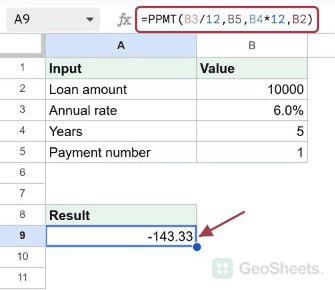
Enter this dataset starting in A1. The first row contains headings. Keep the result area separate from the source table.
| Input | Value |
|---|---|
| Loan amount | 10000 |
| Annual rate | 0.06 |
| Years | 5 |
| Payment number | 1 |
Find principal in the first monthly payment
Enter this formula in A9. For a 10,000 loan at 6% over five years, it isolates the principal in payment 1. Currency formatting can show cents without rounding the underlying calculation.
=PPMT(B3/12,B5,B4*12,B2)Result (rounded for display): -143.328015.
Compare principal in payment twelve
Set period to 12 while retaining the same loan inputs. This returns principal for payment twelve only, not the total principal paid during the first year.
=PPMT(B3/12,12,B4*12,B2)Result (rounded for display): -151.411118.
Use yearly payments instead of monthly payments
For a 5,000 loan at 8% with four annual payments, use the annual rate and four periods directly. No division by 12 is needed.
=PPMT(8%,1,4,5000)Result (rounded for display): -1109.604022.
Build a year-by-year principal schedule
Enter period numbers 1 through 4 in A21:A24 under the heading at A20. Put this formula in B21 and fill down through B24. Only the period reference changes.
| Year | Principal |
|---|---|
| 1 | |
| 2 | |
| 3 | |
| 4 |
=PPMT(8%,A21,4,5000)Result (rounded for display): -1109.604022.
Check principal plus interest against the payment
For the first monthly payment, PPMT plus IPMT should equal PMT. With the same inputs, the subtraction below returns zero to the displayed precision.
=ROUND(PPMT(B3/12,1,B4*12,B2)+IPMT(B3/12,1,B4*12,B2)-PMT(B3/12,B4*12,B2),10)Result: 0.
Handle an out-of-range payment number
A five-year monthly loan has 60 payments. Asking for payment 61 returns an error. Restrict a user-entered payment number to whole numbers from 1 through the total period count.
=PPMT(B3/12,61,B4*12,B2)Result: #NUM!.
Calculate principal when payments start immediately
With timing set to 1, the first payment happens before interest accrues. Its entire amount reduces principal. Supply 0 for future_value before the timing argument.
=PPMT(B3/12,1,B4*12,B2,0,1)Result (rounded for display): -192.366184.
Other Google Sheets articles you may also like